
How to Integrate Terraform with Securden Password Vault for Enterprises
Securden Password Vault for Enterprises integrates with Terraform through the Securden Terraform provider.
The provider enables Terraform configurations to retrieve credentials, keys, and other secrets stored in Securden and perform supported account operations programmatically.
The provider is published in the Terraform Registry under:
SecurdenDevOps/securden
Refer to the Terraform Registry for the provider version applicable to your environment.
Add the Securden Provider to Terraform
Add Securden to the required_providers block:
terraform {
  required_providers {
    securden = {
      source = "SecurdenDevOps/securden"
    }
  }
}
Initialize the Terraform working directory:
terraform init
If your environment requires a fixed provider version, specify the required version in the required_providers configuration.
Prerequisites
Before using Securden from Terraform, obtain:
- Securden Server URL / Host URL
- Authentication Token
- SSL Certificate, if required
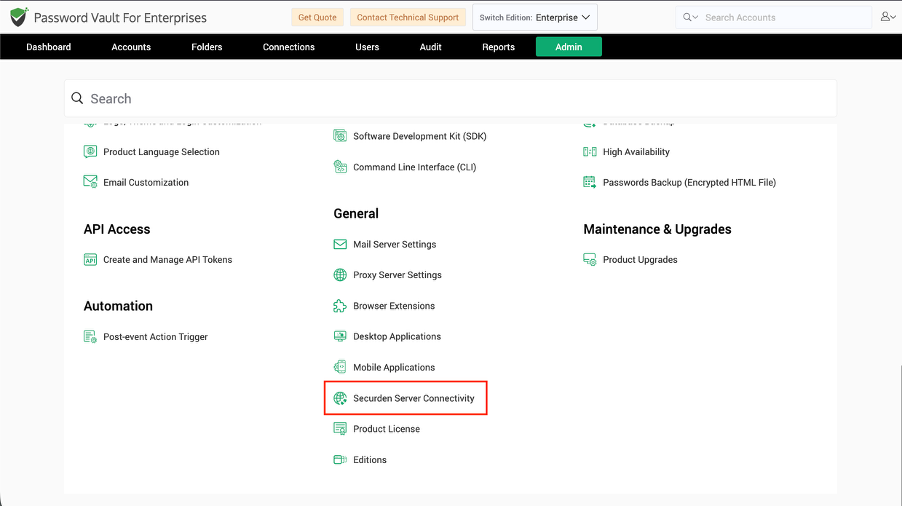
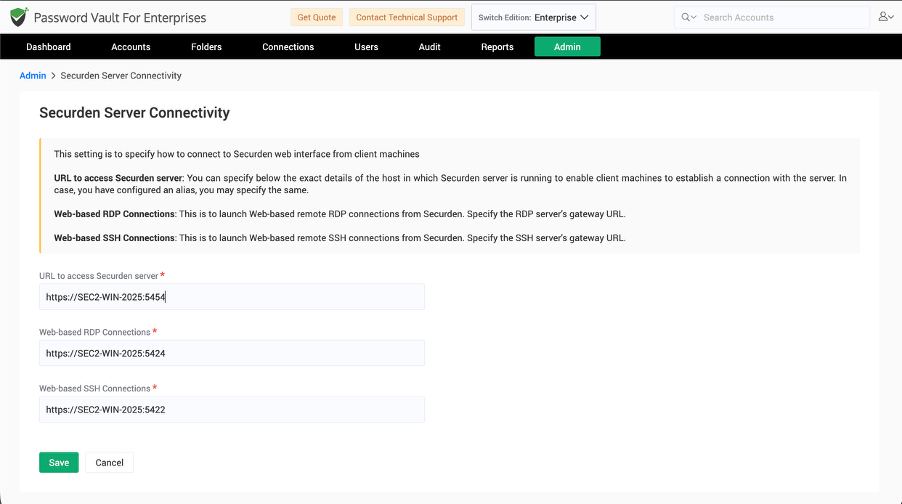
Obtain the Securden Server URL
Navigate to:
Admin >> General >> Securden Server Connectivity
Copy the server URL to use when configuring the Terraform provider.
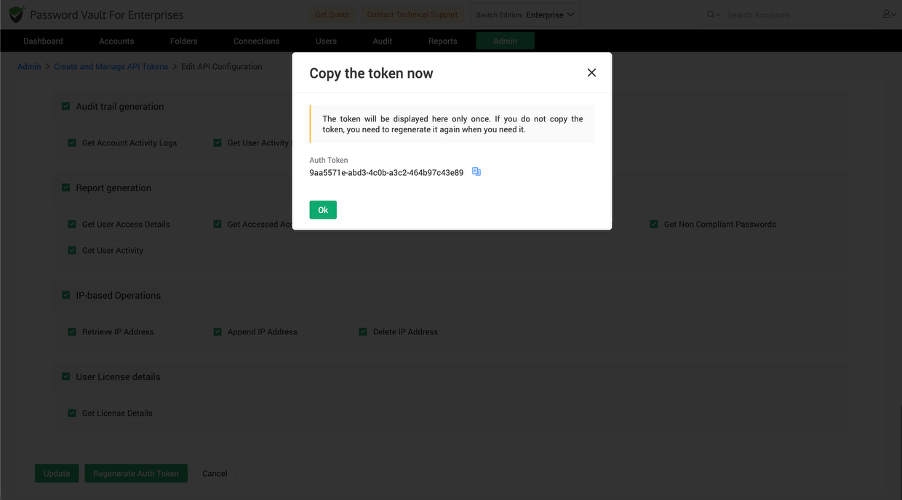
Generate an API Token
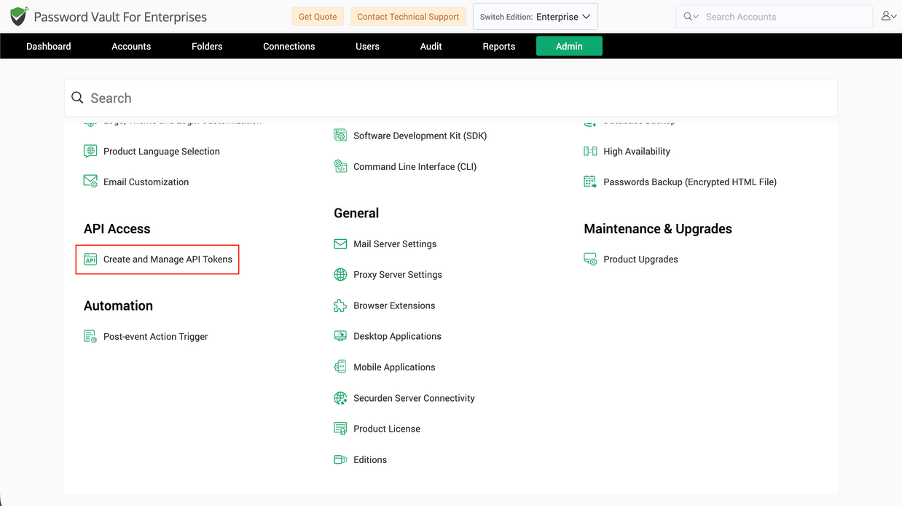
Navigate to:
Admin >> API Access >> Create and Manage API Tokens
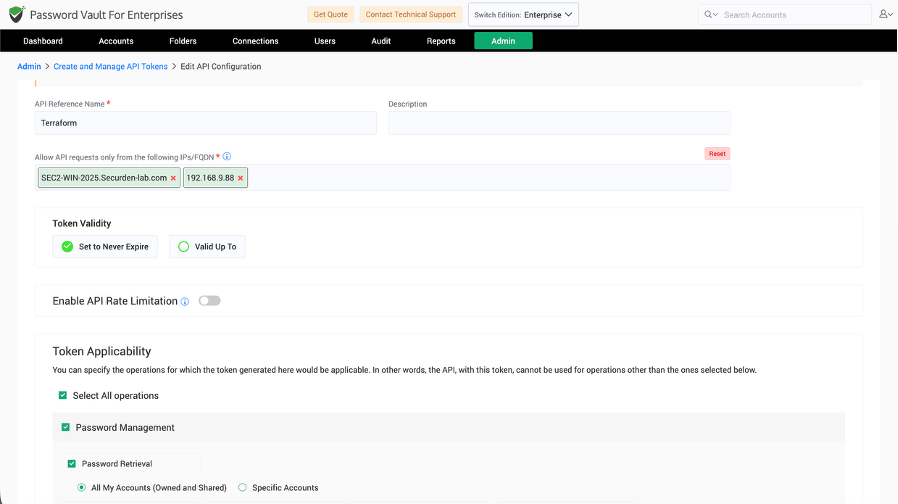
While creating the token:
- Enter an API reference name and description.
- Specify the IP address or range from which the token can be used.
- Select a static or dynamic authentication token as required.
- Select the capabilities the Terraform integration should be allowed to perform.
- Click Create Token.
- Copy the generated authentication token and store it securely.
Configure the Securden Provider
Define variables for the server URL, authentication token, and optional certificate:
variable "server_url" {
  type = string
}

variable "authtoken" {
  type      = string
  sensitive = true
}

variable "certificate" {
  type    = string
  default = null
}
Configure the provider:
provider "securden" {
  server_url  = var.server_url
  authtoken   = var.authtoken
  certificate = var.certificate
}
Set Terraform Environment Variables
You can supply the provider values through Terraform environment variables.
Linux or macOS
export TF_VAR_server_url=https://<SECURDEN_SERVER_URL>
export TF_VAR_authtoken=<SECURDEN_AUTHTOKEN>
export TF_VAR_certificate=/path/to/certificate.pem
Windows
set TF_VAR_server_url=https://<SECURDEN_SERVER_URL>
set TF_VAR_authtoken=<SECURDEN_AUTHTOKEN>
set TF_VAR_certificate=path/to/certificate.pem
Note: Do not add a trailing slash to the Securden server URL.
Configure SSL Certificate Verification
The SSL certificate is optional.
If a certificate is explicitly supplied, the provider uses that certificate for server verification. If no certificate is supplied, the provider attempts to retrieve the server certificate automatically.
Fetch Account Data from Securden
Use the securden_account data source to retrieve account information.
For example:
data "securden_account" "account_data" {
  account_id = 2000000001800
}
An account can be identified using:
- Account ID
- Account Name
- Account Title
If account_name is used and more than one account has the same name, provide account_title to further identify the required account.
Access Retrieved Account Data
For example, to access the password:
output "account_password" {
  value = data.securden_account.account_data.account.password
}
Other account attributes can be accessed similarly:
data.securden_account.account_data.account["private_key"]
data.securden_account.account_data.account["putty_private_key"]
data.securden_account.account_data.account["ppk_passphrase"]
Important: Avoid exposing retrieved secrets through Terraform outputs unless required. Depending on how retrieved values are used, sensitive information can become part of Terraform state or command output.
Access Additional Fields
Additional fields configured for a Securden account can be accessed using the corresponding field name.
For example:
output "additional_field" {
  value = data.securden_account.account_data.account["additional_field_name"]
}
The returned value corresponds to the additional field configured for the account.
Fetch Multiple Accounts
Use securden_accounts to retrieve multiple accounts by Account ID:
data "securden_accounts" "multiple_accounts" {
  account_ids = ["2000000001800", "2000000002801"]
}
Use the Account ID as the key when accessing data for a particular account:
output "first_account" {
  value = data.securden_accounts.multiple_accounts["2000000001800"]["password"]
}
Add an Account
Use the securden_add_account data source to add an account to Securden.
data "securden_add_account" "added_account" {
  account_name  = "Account Name"
  account_title = "Account Title"
  account_type  = "Web Account"
}
The following values are required:
account_nameaccount_titleaccount_type
Other fields can be supplied according to the selected account type.
Supported optional fields include:
passwordpersonal_accountipaddressfolder_idnotestagsaccount_expiration_datedistinguished_nameaccount_aliasdomain_name
Edit an Existing Account
Use the securden_edit_account data source to modify an account.
For example:
data "securden_edit_account" "updated_account" {
  account_id    = 2000000001800
  account_type  = "Web Account"
  account_title = "Updated Title"
}
Provide the Account ID and applicable account details for the account being modified.
Supported attributes include:
account_idaccount_typeaccount_titleaccount_nameipaddressnotestagsfolder_idoverwrite_additional_fieldsaccount_expiration_datedistinguished_nameaccount_aliasdomain_name
The following fields apply only to the relevant account types:
distinguished_name– LDAP domain accounts.account_alias– AWS IAM accounts.domain_name– Google Workspace accounts.
Delete Accounts
Use the securden_delete_accounts data source to delete one or more accounts.
data "securden_delete_accounts" "deleted_accounts" {
  account_ids = [2000000001800, 2000000002800]
  reason      = "Reason for account deletion"
}
account_ids identifies the accounts to be deleted. Supply a reason when required.
By default, deleted accounts are moved to the Recently Deleted Accounts section.
Use the delete_permanently option when permanent deletion is explicitly required.
Account Attributes Available Through Terraform
Depending on the account, the provider can retrieve:
account_idaccount_nameaccount_titlepasswordkey_valueprivate_keyputty_private_keypassphraseppk_passphraseaddressclient_idclient_secretaccount_aliasaccount_filedefault_databasesql_server_portmysql_portoracle_sidoracle_service_nameoracle_port
Only attributes available in the corresponding Securden account can be retrieved.
Frequently Asked Questions
1. What Terraform provider is used to integrate with Securden?
Use the official provider published as SecurdenDevOps/securden in the Terraform Registry.
2. How does Terraform authenticate to Securden Password Vault?
The provider uses the Securden server URL and an API authentication token. An SSL certificate can also be configured for certificate verification.
3. Can Terraform retrieve multiple Securden accounts at once?
Yes. Use the securden_accounts data source and supply the required Account IDs.
4. Can Terraform add, edit, and delete accounts in Securden?
Yes. The provider supports securden_add_account, securden_edit_account, and securden_delete_accounts operations.
5. Can Securden secrets appear in Terraform state?
Sensitive values can become part of Terraform state or output depending on how they are referenced. Avoid exposing credentials through outputs unless required and protect Terraform state appropriately.