
DevOps Secrets Management
DevOps workflows frequently need to authenticate to servers, cloud platforms, databases, applications, and other systems without a user manually entering credentials each time.
The credentials used by these automated workflows are commonly referred to as secrets and can include passwords, API keys, cloud access keys, SSH keys, certificates, tokens, and other sensitive authentication data.
Storing these secrets directly in scripts, configuration files, pipeline definitions, or source-code repositories can expose them to unauthorized users and make credential changes difficult to manage.
Securden Password Vault for Enterprises provides a centralized way to securely store DevOps secrets and make them available to authorized automation tools when required.
Why Use a Centralized Vault for DevOps Secrets?
Without centralized secrets management, DevOps teams can encounter several security and operational challenges:
- Credentials may be hardcoded in scripts, configuration files, or Git repositories.
- Static secrets may remain unchanged for long periods or be shared across multiple workflows.
- Teams may have limited visibility into which automation process accessed a credential and when.
- Changing a credential can disrupt pipelines when the secret is embedded directly in scripts or configuration.
- Secrets can become scattered across multiple tools, environments, and teams.
By storing credentials centrally in Securden, DevOps tools can retrieve the information they require programmatically instead of maintaining separate copies of secrets throughout the software delivery pipeline.
Access DevOps Secrets Management
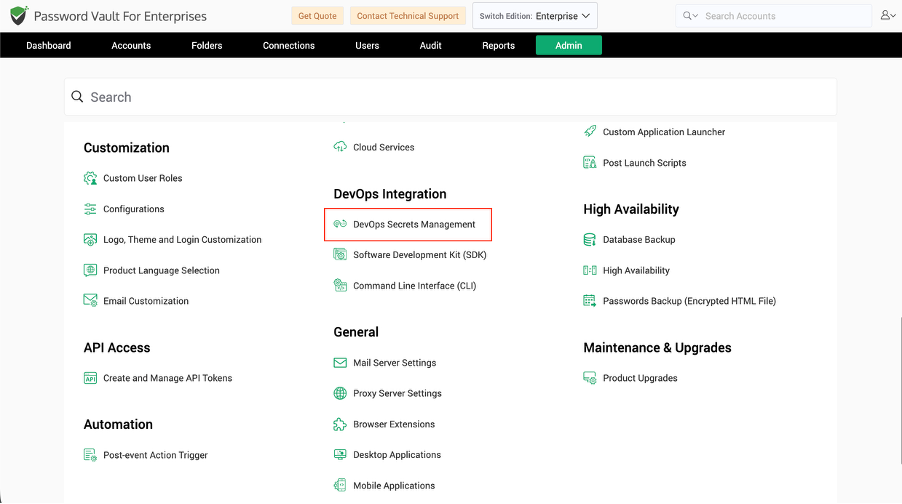
To access the DevOps integration options in Password Vault, navigate to:
Admin >> DevOps Integration >> DevOps Secrets Management
The DevOps Secrets Management page displays the automation tools that can be integrated with Securden.
Supported DevOps Integrations
Securden provides integrations for the following DevOps tools:
- Ansible – Retrieve and manage credentials from Ansible playbooks using the Securden Ansible Lookup Plugin.
- Jenkins – Make credentials and account attributes available to Jenkins projects through the Securden Jenkins Plugin.
- Terraform – Retrieve and manage Securden account data through the Securden Terraform provider.
- Chef – Access and manage accounts from Chef recipes using the Securden Ruby gem.
- Puppet – Retrieve and manage account information from Puppet manifests using the Securden Puppet module.
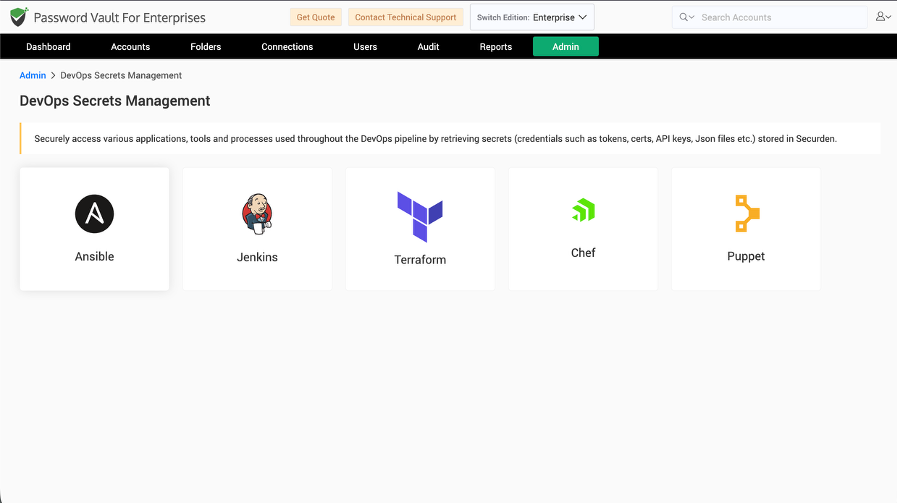
Each integration uses Securden as the central source for credentials while allowing the corresponding DevOps tool to retrieve or use the information programmatically.
The configuration and operations supported by each integration are explained in the subsequent pages.
Frequently Asked Questions
1. What is DevOps secrets management in Securden?
DevOps Secrets Management in Securden allows automation tools to securely retrieve credentials, tokens, keys, and other secrets stored in Password Vault instead of hardcoding them into scripts, pipelines, or configuration files.
2. Which DevOps tools can be integrated with Securden Password Vault?
Securden provides integrations for Ansible, Jenkins, Terraform, Chef, and Puppet.
3. Why should DevOps credentials be stored in a centralized password vault?
A centralized vault reduces credential sprawl, prevents secrets from being embedded directly in automation code, provides controlled access to credentials, and makes it easier to update secrets without maintaining multiple copies.
4. Can DevOps tools retrieve secrets automatically from Securden?
Yes. Depending on the integration, supported tools can programmatically retrieve permitted account credentials and other account attributes from Securden during automated workflows.
5. Where can I configure DevOps integrations in Securden?
Navigate to Admin >> DevOps Integration >> DevOps Secrets Management and select the required DevOps tool.