
How to Integrate Puppet with Securden Password Vault for Enterprises
Securden Password Vault for Enterprises integrates with Puppet through the Securden Puppet module.
The integration allows Puppet manifests to retrieve credentials and other permitted account information from Securden and perform supported account operations programmatically.
Install the Securden Puppet Module
Install the module using:
puppet module install securden-securden
The module provides the components required for Puppet to access Securden credentials dynamically.
Prerequisites
Before using the integration, obtain:
- Securden Server URL / Host URL
- Authentication Token
- SSL Certificate, if required
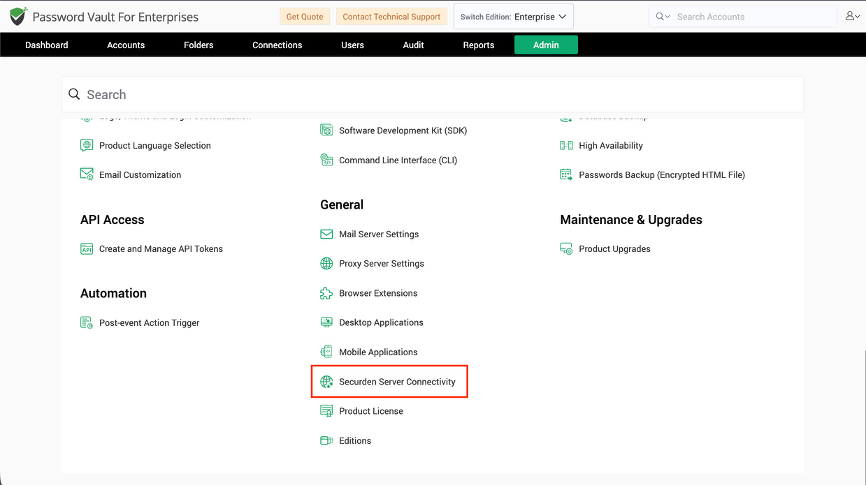
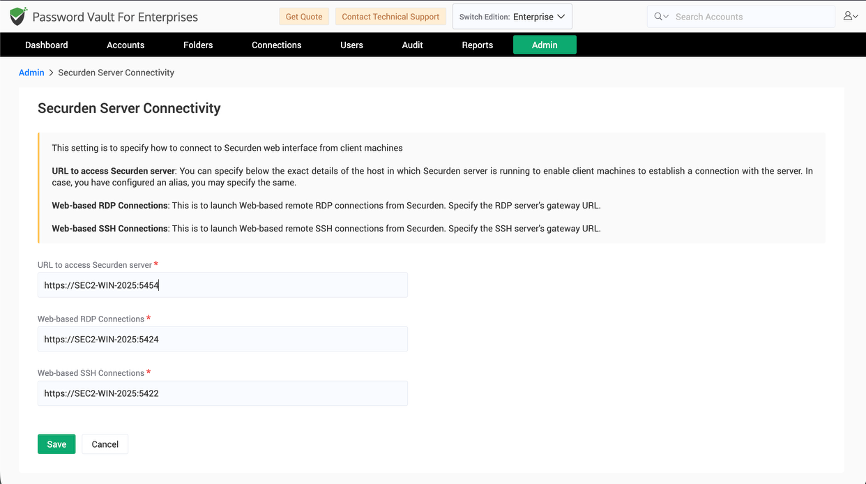
Obtain the Securden Server URL
Navigate to:
Admin >> General >> Securden Server Connectivity
Copy the required server URL and use it when initializing Securden in Puppet.
Generate an API Token
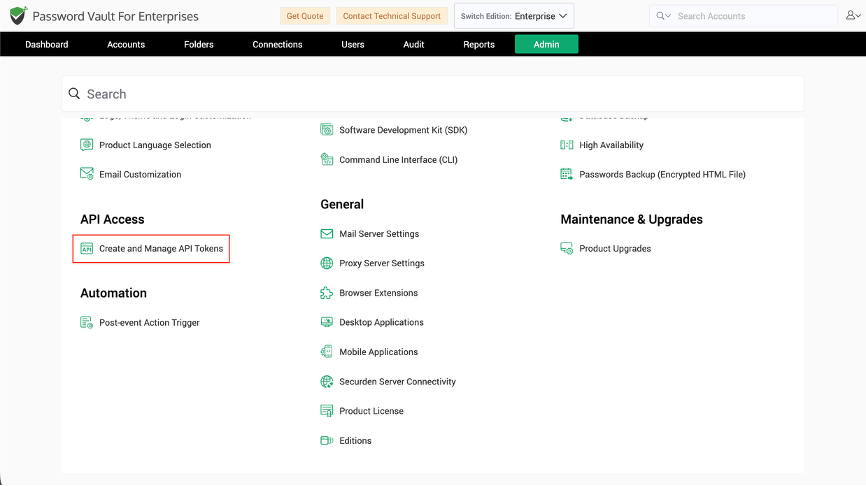
Navigate to:
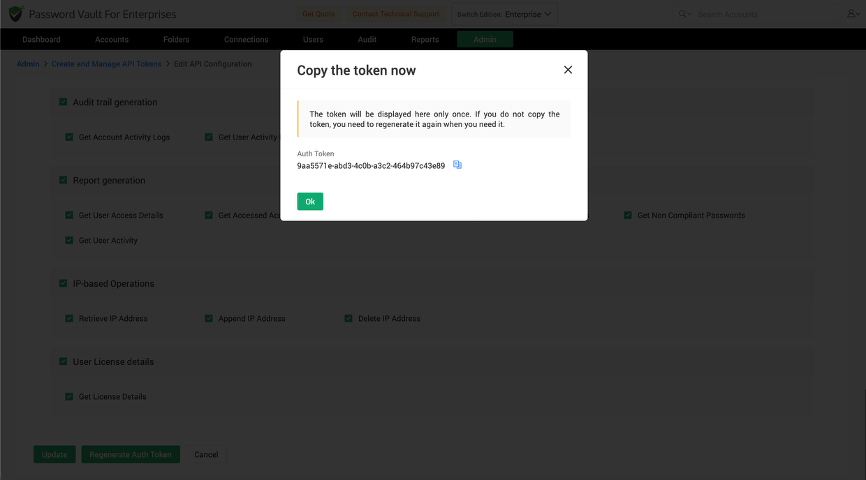
Admin >> API Access >> Create and Manage API Tokens
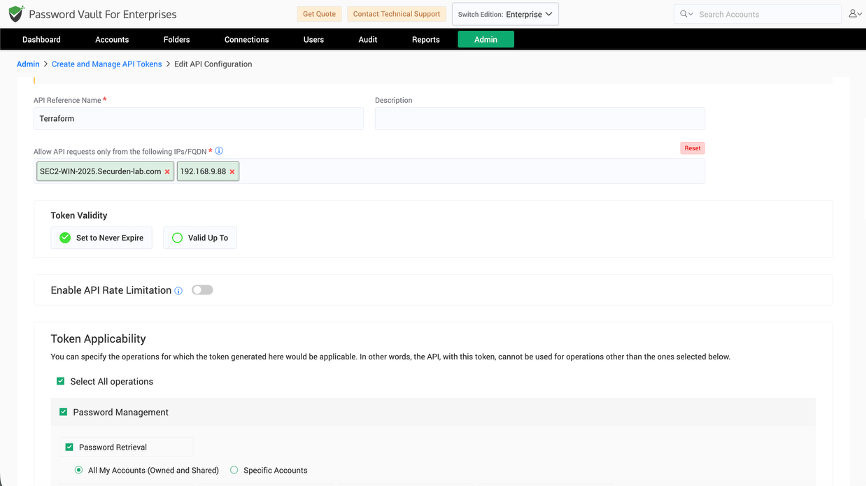
While creating the token:
- Enter an API reference name and description.
- Specify the IP address or IP range from which the token can be used.
- Select a static or dynamic authentication token as required.
- Select the capabilities required by the Puppet integration.
- Click Create Token.
Copy the authentication token and retain it securely.
Initialize Securden in Puppet
Configure the module using the Securden server URL and authentication token.
class { 'securden':
  server_url  => '<SECURDEN_SERVER_URL>',
  authtoken   => '<SECURDEN_AUTHTOKEN>',
  certificate => '/path/to/certificate.pem',
}
The certificate parameter is optional.
If a certificate is supplied, Securden uses it for server verification. If no certificate is provided, the integration attempts to retrieve the server certificate automatically.
Note: Use the module and parameter names supported by the Securden Puppet module version installed in your environment.
Fetch Account Data from Securden
Use the Securden account-retrieval function to retrieve account information.
An account can be identified using its Account ID, Account Name, or Account Title.
For example:
$account = securden::get_account(
  account_title => 'Account Title',
  account_name  => 'Account Name',
  account_type  => 'Account Type',
)
After retrieving the account, access individual values from the returned account data:
$account_password = $account['password']
Provide a Reason or Ticket ID When Required
If justification is enforced for account access or password retrieval, include a reason.
If ticket validation is enabled, include the required ticket_id.
For example:
$account = securden::get_account(
  account_id => 2000000001800,
  reason     => 'Required for deployment',
  ticket_id  => '<TICKET_ID>',
)
These parameters should be supplied whenever the corresponding Securden controls are enabled.
Fetch Multiple Accounts
Use securden::get_accounts to retrieve multiple accounts.
$accounts = securden::get_accounts(
  account_ids => [2000000001800, 2000000002000],
)
Access the returned account by its Account ID:
$account_password = $accounts['2000000001800']['password']
Use:
securden::get_accountfor a single account.securden::get_accountsfor multiple accounts.
Add an Account
Use securden::add_account to add an account.
$new_account = securden::add_account(
  account_title => 'Account Title',
  account_name  => 'Account Name',
  account_type  => 'Web Account',
)
The following fields are mandatory:
account_titleaccount_nameaccount_type
Other supported fields include:
ipaddressnotestagspersonal_accountfolder_idpasswordaccount_expiration_date– DD/MM/YYYYdistinguished_name– Required for applicable LDAP domain accounts.account_alias– Required for applicable AWS IAM accounts.domain_name– Required for applicable Google Workspace accounts.
Edit an Existing Account
Use securden::edit_account and provide the Account ID together with the values that need to be changed.
$updated_account = securden::edit_account(
  account_id    => 2000000001800,
  account_title => 'Updated Account Title',
  account_name  => 'Updated Account Name',
  account_type  => 'Web Account',
)
The supported fields include:
account_id– Required.account_type– Required.account_titleaccount_nameipaddressnotestagsfolder_idoverwrite_additional_fieldsaccount_expiration_datedistinguished_nameaccount_aliasdomain_name
Provide only the attributes applicable to the account type and the information that needs to be changed.
Delete Accounts
Use securden::delete_accounts to delete one or more accounts.
$deleted_account_ids = securden::delete_accounts(
  account_ids => [2000000001800, 2000000002000],
  reason      => 'Reason for account deletion',
)
The operation returns the Account IDs that were successfully deleted.
By default, deleted accounts are moved to the Recently Deleted Accounts section.
To permanently delete the accounts:
$deleted_account_ids = securden::delete_accounts(
  account_ids        => [2000000001800, 2000000002000],
  reason             => 'Reason for account deletion',
  delete_permanently => true,
)
Account Attributes Available Through Puppet
Depending on the account type and configuration, Puppet can access the following account attributes:
account_idaccount_nameaccount_titlepasswordprivate_keyputty_private_keypassphraseppk_passphraseaddressclient_idclient_secretaccount_aliasaccount_filedefault_databaseoracle_sidoracle_service_nameport
Access Additional Fields
Custom fields configured for a Securden account can also be accessed through the Puppet integration.
The available additional fields depend on the account type and the fields configured for the corresponding account in Password Vault.
Frequently Asked Questions
1. How do I install the Securden integration for Puppet?
Install the Securden Puppet module using puppet module install securden-securden.
2. How does Puppet authenticate to Securden Password Vault?
Initialize the Securden module with the Password Vault server URL and an API authentication token. An SSL certificate can also be provided when required.
3. Can Puppet retrieve several Securden accounts in one request?
Yes. Use securden::get_accounts and provide the Account IDs of the required accounts.
4. Can Puppet add, edit, and delete accounts in Securden?
Yes. The integration supports account creation, editing, and deletion through securden::add_account, securden::edit_account, and securden::delete_accounts.
5. Can Puppet access custom fields stored in Password Vault?
Yes. Custom fields associated with an account can be accessed through the integration. The fields available depend on the corresponding account type and its configuration.