NHI Security Platform Architecture
Securden NHI Security Platform discovers and secures non-human identities and their secrets across cloud platforms, code repositories and servers. This page describes its components, connectivity, data flow, network ports and security design.
Architecture Overview
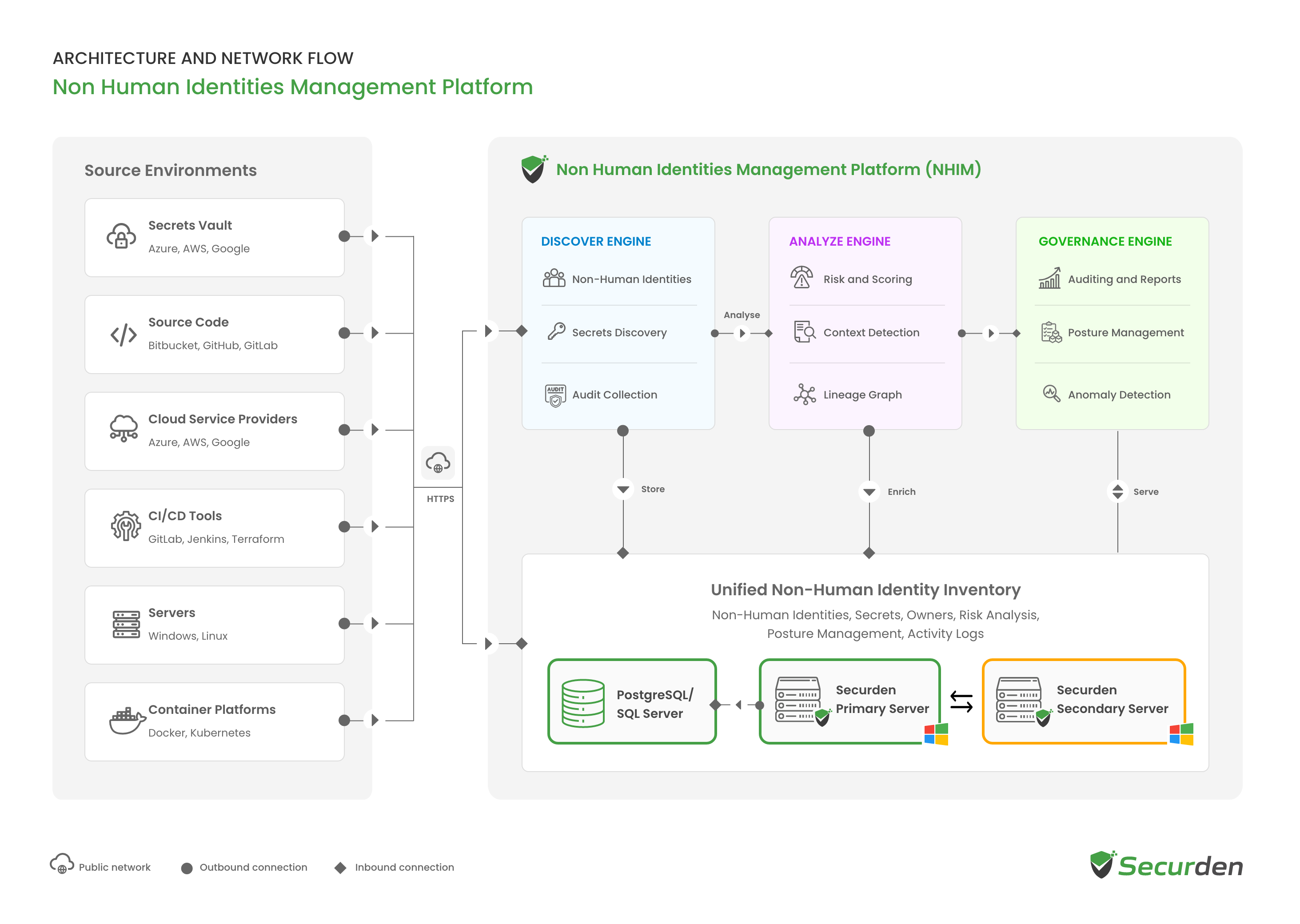
Securden NHI Security Platform is delivered as a module of Securden Unified PAM (Privileged Access Management). The solution runs on a Securden primary server on Windows, connected to a backend database, with a secondary server for high availability. Administrators access it through a standard web browser.
The solution connects to cloud platforms, code repositories and servers to discover non-human identities and their credentials. Cloud platforms and code repositories are accessed through each provider's API over HTTPS on port 443. IIS servers are accessed over SSH or Windows Remote Management (WinRM), and Linux devices over SSH, using machine credentials. No agents are installed on source systems, and all processing takes place within the solution.
Discovered data is processed in sequence. The Discover Engine collects identities, secrets and activity records from connected sources and stores them in a central inventory. The Analyze Engine assesses each record for risk. The Governance Engine makes the inventory, findings and audit records available for review and reporting.
Architecture Diagram
Platform Components
Discover Engine
Connects to configured sources and collects non-human identities, their credentials and available activity records. Depending on the source, these include cloud roles and users, service principals, application integrations, deploy keys, access keys and tokens. All collected data is recorded in the inventory.
Analyze Engine
Assesses each identity and secret in the inventory for risk, based on permissions, credential strength and rotation, ownership, activity, and the resources an identity can reach. Each assessment produces a risk score and findings that identify the conditions behind it.
Governance Engine
Makes the inventory, risk findings and audit records available for review and reporting.
Unified Non-Human Identity Inventory
Maintains a central record of the identities and secrets discovered across connected environments, including their source, ownership, status, associated credentials, risk assessment and available activity history. The inventory is the shared data store used by all three engines. The inventory is stored in the backend database and served by the Securden servers.
Deployment Components
Securden Primary Server
Runs the web interface and the Discover, Analyze and Governance Engines, and handles all business logic. The server runs on Windows and is installed from a single package that includes a built-in web server.
Backend Database
Stores the Unified Non-Human Identity Inventory. PostgreSQL is bundled by default, and Microsoft SQL Server can be used instead. Sensitive data is encrypted at the application level with AES-256 before it is stored.
Securden Secondary Server
Acts as a standby server in high availability configurations. It has its own database, receives encrypted replication from the primary server, and takes over if the primary server fails.
Source Environments and Connectivity
The solution connects to the systems where non-human identities and their credentials are created, stored and used.
| Environment | Supported sources |
|---|---|
| Cloud platforms | AWS, Microsoft Azure |
| Source code repositories | GitHub, Bitbucket |
| Web servers | Internet Information Services (IIS) Manager |
| Servers | Linux |
Data Source Connections
The solution connects to each data source without installing an agent on it.
- Cloud platforms and code repositories: accessed through the provider's API over HTTPS on port 443, authenticated with an access key, a service principal, OAuth or a platform app, depending on the provider.
- IIS servers: accessed over SSH on port 22 or WinRM over HTTPS on port 5986, using Windows machine credentials.
- Linux devices: accessed over SSH on port 22, using a username and password for the device.
The permissions granted to each connection determine what the solution can access. These connections originate from the primary application server.
Discovery Synchronization
Discovery runs continuously against each configured source, and any source can be synchronized on demand. Each synchronization updates the inventory and is recorded in the audit trail.
Identity Discovery and Risk Assessment
Identity Discovery
The Discover Engine retrieves identities from connected sources and classifies them by type. For each identity, it records the source, environment, status, severity, creator, owner and multi-factor authentication state, where the source exposes them. Ownership is identified from the logs available at the source. Where no logs are available, a business owner and a technical owner can be assigned in Securden.
Secret Discovery
Credentials are discovered in two ways: through the source integrations, and by scanning accessible content for exposed secrets. Content scanning uses built-in detection rules and customer-defined regular expressions, and specific file types can be excluded from scans. Each secret is classified and recorded with its source location, environment, severity, available usage information and entropy score. The entropy score measures the randomness of a value and distinguishes real credentials from placeholder text.
Risk Assessment
Assessment runs when a record is discovered and can be run again on demand. Identities are assessed on permissions, credential condition, activity, ownership and blast radius, which is the number of secrets an identity can reach. Secrets are assessed on strength, rotation status, severity and expiry. Each assessment returns a risk score. For secrets, the assessment also identifies the specific conditions behind the score, such as an AWS access key older than 180 days or console access without multi-factor authentication.
Credential Remediation
The remediation available for a credential depends on its type and on the capabilities of the connected source.
Direct Rotation
Where a source provider supports programmatic rotation, supported credentials are rotated directly at the provider.
Guided Replacement
Some credentials cannot be rotated in place because the provider returns the secret only once, at creation. For these credentials, the solution provides a replacement sequence with security checks and links to the provider's documentation, and each step is carried out by an administrator. For an AWS IAM access key, the sequence is to create a new key, move dependent workloads to it and verify them, and deactivate the old key before deleting it.
Security, Access, and Deployment
Authentication, Access Control, and Auditing
Authentication
Users access the NHI module through Unified PAM, which supports local accounts, Active Directory, Microsoft Entra ID, LDAP (Lightweight Directory Access Protocol) and RADIUS (Remote Authentication Dial-In User Service) for authentication. Single sign-on is supported through SAML 2.0 (Security Assertion Markup Language) identity providers, and multi-factor authentication through authenticator apps, hardware keys and integrated providers.
Activity Logging and Auditing
The solution records operations performed on connections, identities and secrets, including discovery synchronization, connection authorization, owner assignment, risk assessment and secret retrieval. Each record captures the entity, operation, user, originating IP address, timestamp and stated reason. Audit records can be forwarded to a SIEM (security information and event management) platform.
Encryption and Data Security
Discovered Secrets
Secret values collected during discovery are stored in the Securden database. Values can be retrieved through the solution, and each retrieval is recorded in the audit trail with the user, timestamp, originating IP address and stated reason.
Encryption at Rest
| Security control | Details |
|---|---|
| Data encryption | Sensitive data is encrypted at the application level with AES-256 before it is stored. |
| Key management | A unique, randomly generated installation key, kept separate from the encrypted data and needed only at startup. The key can be stored in a separate network location accessed through a dedicated service account, or in a mounted physical hardware security module (HSM). |
| Database protection | Accepts connections from localhost only by default, with specific IP allow-listing for high availability configurations. |
| FIPS | A FIPS (Federal Information Processing Standards) compliant mode is available. |
Data in Transit
The web interface connects to the application server over HTTPS, and the application server connects to the database over SSL. Connections to cloud platforms and code repositories use HTTPS on port 443. IIS servers are accessed over SSH or WinRM over HTTPS, and Linux devices over SSH.
Deployment, High Availability, and Disaster Recovery
High availability uses a primary server and a standby secondary server. Each server has its own database, and the primary server replicates its data to the secondary server over an encrypted connection. If the primary server fails, the secondary server takes over.
Backups are fully encrypted, and the encryption key is kept separate from the backup copy. The key is required to restore data from a backup.
Server sizing, database requirements and deployment prerequisites are described in the NHI Security Platform deployment guide.
Data Flow
Administrator Access
- Administrators access the Securden web interface through a browser over HTTPS. No client software is required.
- The primary server applies role-based access control and multi-factor authentication.
- Each retrieval of a discovered secret value is recorded in the audit trail with the user, originating IP address, timestamp and stated reason.
Data Source Connection and Discovery
- A data source is added and authenticated with an access key, a service principal, OAuth or a platform app for cloud platforms and code repositories, or with machine credentials for IIS servers and Linux devices.
- The solution connects to the source over HTTPS on port 443 for cloud platforms and code repositories, over SSH or WinRM over HTTPS for IIS servers, and over SSH for Linux devices. No agent is installed on the source.
- The Discover Engine retrieves identities, secrets and available activity records, and stores them in the Unified Non-Human Identity Inventory in the Securden database.
- Synchronization runs continuously and can also be initiated on demand. Each synchronization is recorded in the audit trail.
Analysis and Reporting
- The Analyze Engine assesses the records in the inventory and adds risk scores and findings.
- The Governance Engine makes the inventory, findings and audit records available through the web interface and through reports exportable to PDF, CSV and XLSX.
- Both engines run within the solution.
Remediation
- Supported credentials are rotated directly at the source provider.
- For guided replacement, an administrator carries out each step at the provider, following the sequence and checks set out by the solution.
High Availability
- The primary server replicates its data to the secondary server.
- If the primary server fails, the secondary server takes over.
Ports Required
The principal ports used by the NHI Security Platform are listed below. Directory, authentication, proxy and integration ports are listed in the NHI Security Platform deployment guide.
| Port name | Source | Destination | Port (TCP) | Details |
|---|---|---|---|---|
| Web console | Users' machines and the secondary server | Primary application server | 5959 |
Can be changed to 443 or another port |
| Web console | Users' machines | Secondary application server | 5959 |
Only with high availability |
| PostgreSQL database | Primary and secondary application servers | PostgreSQL database server | 5858 |
Default database |
| Microsoft SQL Server database | Primary and secondary application servers | Microsoft SQL Server | 1433 |
Only if Microsoft SQL Server is the database |
| Cloud platforms and code repositories | Application server | AWS, Microsoft Azure, GitHub and Bitbucket APIs | 443 (HTTPS) |
Discovery and synchronization |
| IIS Manager | Primary application server | IIS servers | 22 (SSH) or 5986 (WinRM over HTTPS) |
Uses Windows machine credentials |
| Linux devices | Primary application server | Linux devices | 22 (SSH) |
Uses a username and password for the device |
| Mail (SMTP over TLS) | Application server | Mail server | 587 |
Alerts about identities and secrets |
| Mail (SMTP over SSL) | Application server | Mail server | 465 |
Alerts about identities and secrets |