Securden Certificate Lifecycle Management manages certificates across certificate authorities, cloud certificate stores and target systems. This page describes its components, connectivity, issuance, renewal, deployment, data flow, network ports and security design.
Architecture Overview
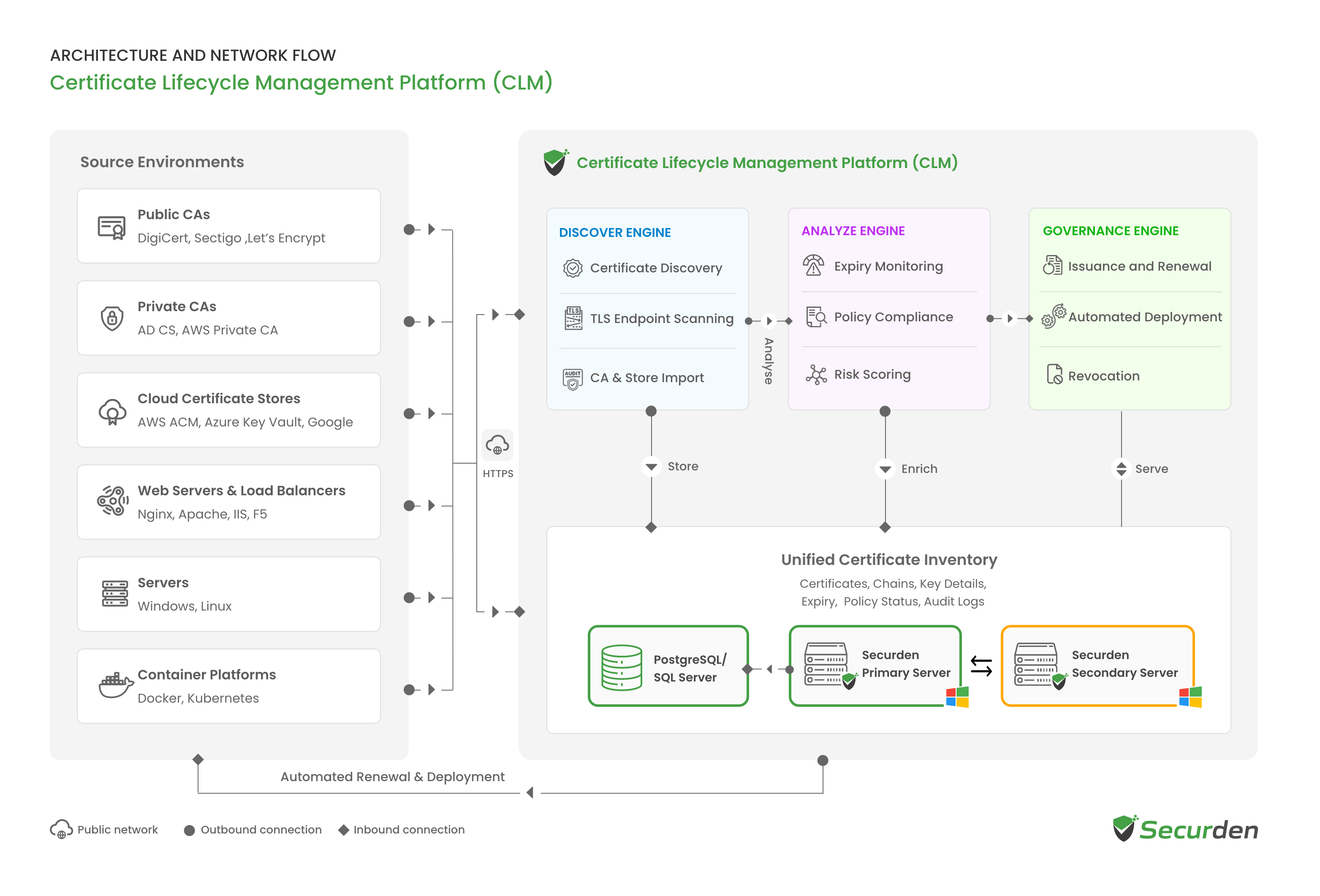
Securden Certificate Lifecycle Management is delivered as part of Securden Unified PAM (Privileged Access Management). The solution runs on a Securden primary server on Windows, connected to a backend database, with a secondary server for high availability. Administrators access it through a standard web browser.
Certificate authorities, ACME (Automated Certificate Management Environment) providers and cloud certificate stores are accessed over HTTPS on port 443. Certificates are deployed to Windows and Linux systems over SSH on port 22. No agents are installed on source or target systems.
Discovered certificates are held in the Unified Certificate Inventory. The Discover Engine populates the inventory, the Analyze Engine evaluates each certificate for expiry, risk, policy , and compliance, and the Governance Engine handles issuance, renewal, deployment and revocation.
Architecture Diagram
Platform Components
Discover Engine
Identifies certificates through certificate discovery, TLS endpoint scanning and import from certificate authorities and certificate stores. TLS endpoint scanning reads the certificates presented by live servers. Certificates can also be added manually. All discovered certificates are recorded in the Unified Certificate Inventory.
Analyze Engine
Evaluates each certificate in the inventory for expiry, risk and policy compliance. It tracks the validity of every certificate, flags certificates that have expired or will expire within seven days, and orders upcoming expirations by the days remaining. Each certificate is given a risk score and checked against certificate policies, and its policy status is recorded in the inventory.
Governance Engine
Issues and renews certificates, deploys them automatically to target systems, and revokes certificates that are no longer required.
Unified Certificate Inventory
Maintains a central record of each certificate, including its chain, key details, owner, install locations, expiry, policy status and audit logs. The inventory is the shared data store used by all three engines. It is stored in the backend database and served by the Securden servers.
Deployment Components
Securden Primary Server
Runs the web interface and the Discover, Analyze and Governance Engines, and handles all business logic. The server runs on Windows and is installed from a single package that includes a built-in web server.
Backend Database
Stores the Unified Certificate Inventory. PostgreSQL is bundled by default, and Microsoft SQL Server can be used instead. Sensitive data is encrypted at the application level with AES-256 before it is stored.
Securden Secondary Server
Acts as a standby server in high availability configurations. It has its own database, receives encrypted replication from the primary server, and takes over if the primary server fails.
Certificate Sources and Connectivity
The solution connects to the certificate authorities, certificate stores and systems where certificates are issued, stored and used.
| Category | Sources |
|---|---|
| Public certificate authorities | GoDaddy, The SSL Store, DigiCert, GlobalSign, Sectigo, Entrust, emSign |
| ACME providers | Let's Encrypt, Buypass Go SSL, ZeroSSL, Telia, and any custom ACME-compatible provider |
| Private certificate authorities | Securden private root certificate authority, Active Directory Certificate Services (AD CS), AWS Private Certificate Authority |
| Cloud certificate stores | AWS Certificate Manager (ACM), Azure Key Vault, Google Cloud |
| Web servers and load balancers | Nginx, Apache, Internet Information Services (IIS), F5 |
| Servers | Windows, Linux |
| Container platforms | Docker, Kubernetes |
Connections
The solution connects to each source and target system without installing an agent on it.
- Certificate authorities and certificate stores: public certificate authorities, ACME providers, cloud certificate stores and AWS Private Certificate Authority are accessed over HTTPS on port 443.
- Windows and Linux systems: certificates are deployed over SSH on port 22. OpenSSH Server must be installed on each target system.
- ACME domain validation: the ACME provider connects to the application server over HTTPS on port 443 to validate control of the domain. The application server must be reachable from the internet on this port.
These connections originate from the primary application server.
Issuance, Renewal and Deployment
Issuance
Certificate requests are raised for the organization's domains. Each request generates a certificate signing request (CSR) from a reusable template, including the subject alternative names (SANs) the certificate covers.
The CSR is signed by a private certificate authority, submitted to a public certificate authority or an ACME provider, or self-signed. Supported private certificate authorities include the private root certificate authority created within the solution, Active Directory Certificate Services and AWS Private Certificate Authority. Before an ACME provider issues a certificate, it validates control of the domain by connecting to the application server on port 443.
Renewal and Revocation
Certificates nearing expiry are renewed without a new manual request. The solution generates a new CSR, submits it to the certificate authority, extends the certificate's validity and deploys the renewed certificate. Certificates issued through ACME are renewed automatically. Certificates can also be revoked from the solution.
Deployment
Certificates are deployed to Windows and Linux systems, including the Microsoft Certificate Store on Windows, over SSH on port 22. Each deployment issues the certificate, pushes it to the target system, binds it to the service that uses it, and verifies the result. Certificate issuance and deployment make changes in the target environment.
Security, Access, and Deployment
Authentication, Access Control, and Auditing
Authentication
Users access the solution through Unified PAM, which supports local accounts, Active Directory, Microsoft Entra ID, LDAP (Lightweight Directory Access Protocol) and RADIUS (Remote Authentication Dial-In User Service) for authentication. Single sign-on is supported through SAML 2.0 (Security Assertion Markup Language) identity providers, and multi-factor authentication through authenticator apps, hardware keys and integrated providers.
Activity Logging and Auditing
The solution records certificate management operations, including certificate addition and certificate signing request creation. Each record captures the entity and source, action, user, originating IP address, timestamp and stated reason. Audit records can be forwarded to a SIEM (security information and event management) platform. Prebuilt reports cover expiring, expired and self-signed certificates, and can be exported to PDF, CSV and XLSX.
Encryption and Data Security
Encryption at Rest
| Security control | Details |
|---|---|
| Data encryption | Sensitive data is encrypted at the application level with AES-256 before it is stored. |
| Key management | A unique, randomly generated installation key, kept separate from the encrypted data and needed only at startup. The key can be stored in a separate network location accessed through a dedicated service account, or in a mounted physical hardware security module (HSM). |
| Database protection | Accepts connections from localhost only by default, with specific IP allow-listing for high availability configurations. |
| FIPS | A FIPS (Federal Information Processing Standards) compliant mode is available. |
Data in Transit
The web interface connects to the application server over HTTPS, and the application server connects to the database over SSL. Connections to certificate authorities, ACME providers and cloud certificate stores use HTTPS on port 443. Certificates are deployed to target systems over SSH on port 22.
Deployment, High Availability, and Disaster Recovery
High availability uses a primary server and a standby secondary server. Each server has its own database, and the primary server replicates its data to the secondary server over an encrypted connection. If the primary server fails, the secondary server takes over.
Backups are fully encrypted, and the encryption key is kept separate from the backup copy. The key is required to restore data from a backup.
Server sizing, database requirements and deployment prerequisites are described in the deployment guide.
Data Flow
Administrator Access
- Administrators access the Securden web interface through a browser over HTTPS. No client software is required.
- The primary server applies role-based access control and multi-factor authentication.
- Each certificate operation is recorded in the audit trail with the user, originating IP address, timestamp and stated reason.
Certificate Discovery and Analysis
- The Discover Engine identifies certificates through certificate discovery, TLS endpoint scanning, and import from certificate authorities and cloud certificate stores, and records them in the Unified Certificate Inventory in the Securden database.
- The Analyze Engine evaluates each certificate for expiry and risk, and checks it against policy.
Issuance and Deployment
- A certificate request is raised for one of the organization's domains, and the solution generates a certificate signing request from a template, including the subject alternative names.
- The request is signed by a private certificate authority, or sent to a public certificate authority or an ACME provider over HTTPS on port 443.
- For ACME requests, the provider validates control of the domain by connecting to the application server on port 443.
- The signed certificate is added to the inventory and deployed over SSH on port 22. It is pushed to the target system, bound to the service that uses it, and verified.
Renewal and Revocation
- When a certificate nears expiry, renewal generates a new certificate signing request, submits it to the certificate authority, extends the certificate's validity and deploys the renewed certificate. Certificates issued through ACME are renewed automatically.
- Certificates can be revoked from the solution.
High Availability
- The primary server replicates its data to the secondary server.
- If the primary server fails, the secondary server takes over.
Ports Required
The principal ports used by Securden Certificate Lifecycle Management are listed below. Directory, authentication, proxy and integration ports are listed in the deployment guide.
| Port name | Source | Destination | Port (TCP) | Details |
|---|---|---|---|---|
| Web console | Users' machines and the secondary server | Primary application server | 5959 |
Can be changed to 443 or another port |
| Web console | Users' machines | Secondary application server | 5959 |
Only with high availability |
| PostgreSQL database | Primary and secondary application servers | PostgreSQL database server | 5858 |
Default database |
| Microsoft SQL Server database | Primary and secondary application servers | Microsoft SQL Server | 1433 |
Only if Microsoft SQL Server is the database |
| Public certificate authorities | Application server | API of each certificate authority | 443 (HTTPS) |
Certificate requests and renewals |
| ACME providers | Application server | ACME service of each provider | 443 (HTTPS) |
Certificate requests and renewals |
| ACME domain validation | ACME provider | Application server | 443 (HTTPS) |
Inbound from the internet |
| Cloud certificate stores and AWS Private Certificate Authority | Application server | AWS Certificate Manager, Azure Key Vault, Google Cloud and AWS Private Certificate Authority APIs | 443 (HTTPS) |
Certificate import and issuance |
| Certificate deployment | Primary application server | Windows and Linux systems receiving certificates | 22 (SSH) |
Requires OpenSSH Server on the receiving system |
| Mail (SMTP over TLS) | Application server | Mail server | 587 |
Certificate expiry alerts |
| Mail (SMTP over SSL) | Application server | Mail server | 465 |
Certificate expiry alerts |