Users on offline endpoints should not be granted administrator accounts. They should be granted just enough privileges to complete tasks and only when required. While many methds are available for managing user privileges on offline endpoints, using an endpoint privilege manager would solve the problem of controlling and monitoring the elevated access even when the endpoints are offline.
Securden Endpoint Privilege Manager provides offline access provisions that allow users to dynamically gain admin rights using offline access codes when they are using offline endpoints.
What are offline endpoints?
Offline endpoints are computers that are not connected to the corporate network in the context of business organizations. The IT administrator has challenges when managing such endpoints. They are difficult to manage because the latest changes cannot always be pushed to these devices.
When an EPM is deployed and admin rights are stripped from the users, offline endpoints will not allow the end users to dynamically gain admin rights by placing requests. Here, Securden EPM provides offline access provisions that help the end user to carry out their tasks seamlessly.
How are Endpoints and the Securden EPM Server Connected?
Securden EPM works according to the architecture explained below.
- The EPM admin console is installed on a central server in on-premises deployments. The EPM server resides in the cloud in SaaS deployments.
- The agents are deployed on the endpoints to handle privilege management operations in accordance with the policies dictated by the central server.
- The agents communicate with the central server in short intervals to update the server on activities and fetch latest policy updates and approval status updates for privilege elevation requests.
The endpoints are typically confined to that network and are in constant contact with the servers according to the configurations set by the IT administrators.
How does Connectivity between the EPM Server and Endpoints Get Severed?
The privilege management agent can stop communicating with the central EPM server in many situations. Here are some examples:
- The central server is down for maintenance purposes.
- Loss of connectivity due to firewall misconfigurations.
- Loss of internet connectivity on the endpoint. (In SaaS deployments)
- The employee needs to work remotely. (In on-prem deployments)
Similarly, many other scenarios cause loss of communication between the Securden agent and the EPM server.
How to manage privileges on these offline endpoints?
To handle privilege management in such scenarios, Securden provides a code-based privilege elevation mechanism which the users can use to get permissions to run applications and elevate privileges.
Offline access codes can be used in two ways. The administrator can enable/disable each of the options if needed.
- Codes are generated by users for themselves.
- Codes are generated by Admins for users.
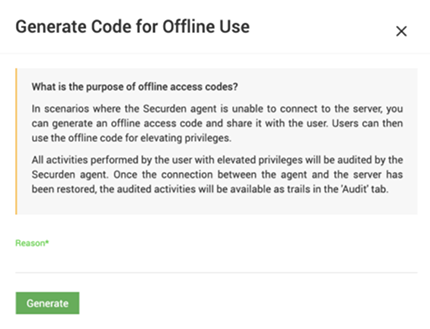
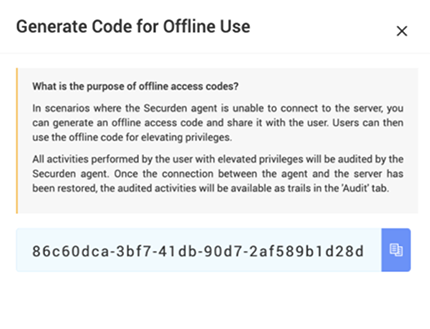
Users can make use of these codes to elevate applications or gain temporary full-local admin rights in accordance with the preferences set by the Securden EPM administrator.
How to configure offline access code?
The Administrator in Securden can configure the preferences to control how users can use offline access codes.
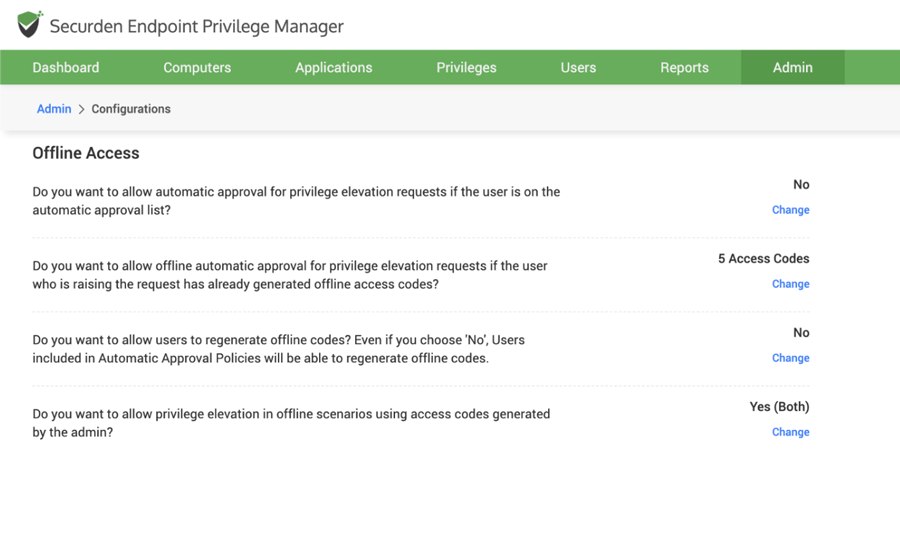
Each of the option below can be enabled/disabled to control how offline codes are used.
- Accessing applications that are not allowlisted
- Elevating individual applications
- Getting temporary full-admin rights
Every privilege elevation activity performed using offline access codes gets tracked by the Securden Agent. Once the connectivity between the agent and the server is restored, then all these activities are populated in the audit trails.
Securden EPM helps enforce accountability for actions even on offline endpoints.

