- On-prem
- SaaS
Endpoint Privilege Manager (On-Premises) Overview
Securden EPM is available as a completely self-hosted, on-premises, software only solution and is available as a binary-package for installation on Windows servers.
The package contains everything needed, and you don’t require any other hardware or software. It comes with an inbuilt web server and PostgreSQL server as the RDBMS. Optionally, you can use MS SQL Server as the backend database. You do not require multiple hardware servers for product installation.
The solution runs on a central server connected to a backend database. The server handles all business logic. End-users connect to the server using any standard web browser or make use of the Securden Agent installed on their own endpoints.
Solution Layers
The solution is built with an architecture of two distinct layers. The application layer handles business logic and manages queries and requests from users (agents). This layer includes the primary and secondary servers that handle incoming traffic and manage operations. The secondary servers are prescribed for configuring high availability, load balancing, and for supporting distributed deployments.
The database securely stores system data and details of associated assets in the encrypted form. It handles and processes all write operations in the database.
Securden Endpoint Privilege Manager On-Premises is deployed as a single solution comprising the following modules.
- Endpoint Privilege Management (Windows, macOS, and Linux)
Eliminates local admin rights and dynamically elevates applications for standard users in compliance with the principle of least privileges through Just-in-Time, just enough access. - Application Control
Controls which applications users are allowed to execute on their endpoints through allowlisting (explicit trust) and blocklisting (implicit trust) policies.
Product Components and Architecture
The architecture diagram encompasses all the components users and administrators will interact with when using Securden Endpoint Privilege Manager to avail privilege management, application control, and secure remote access capabilities on Windows, macOS, and Linux devices.
The components are explained below:
- Application Interface
- Securden Agent
- Load Balancers
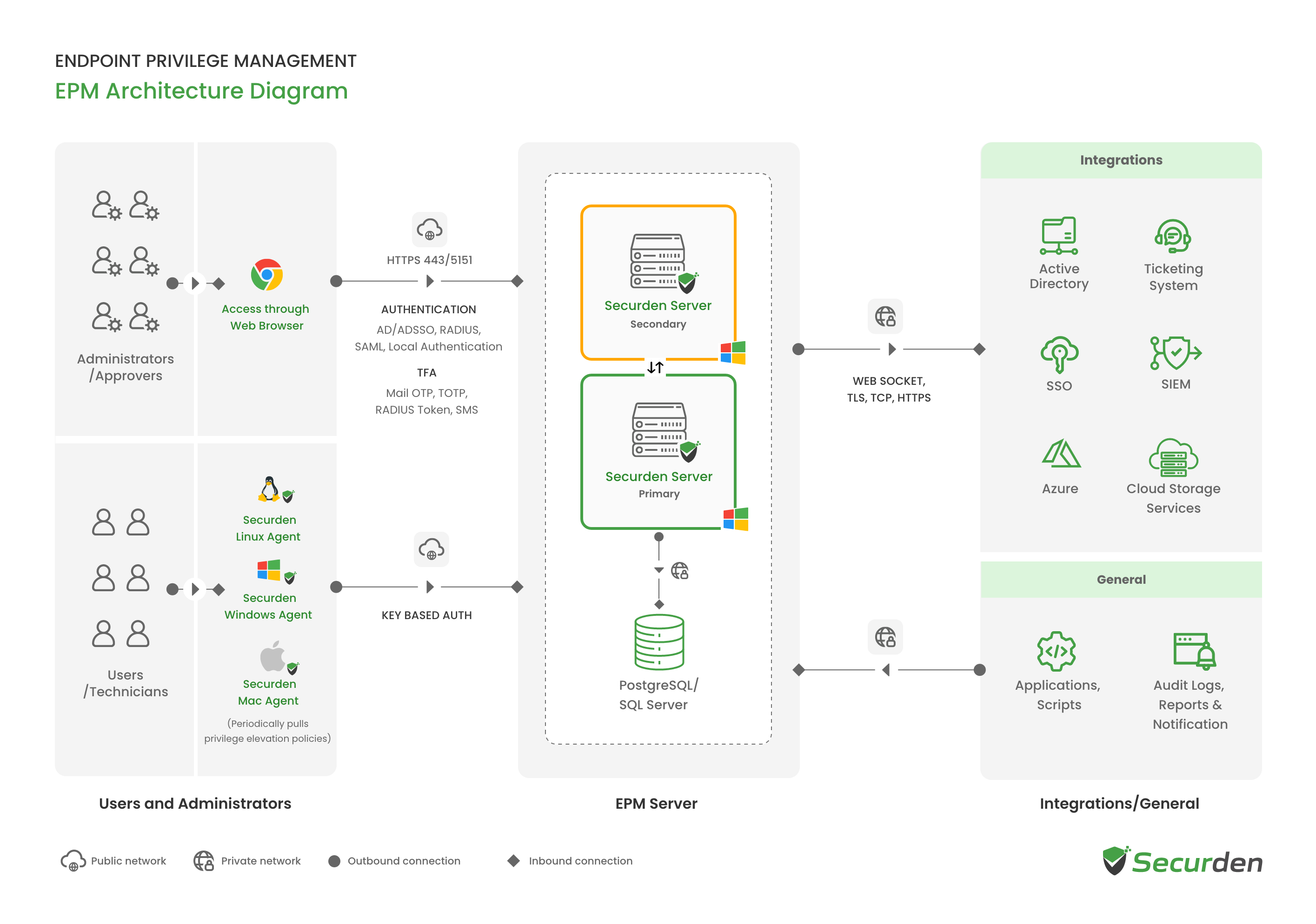
Application Interface
The Endpoint Privilege Manager web interface can be accessed by Administrators and Users using any standard web browser. Users and administrators can be onboarded from Active Directory, Entra ID, Google Workspace or created manually.
User accounts on endpoints can be automatically imported into endpoint privilege manager using the Securden Agent. Deploy the agent on all the required endpoints using GPOs, Configurations Manager, Intune, PDQ Deploy, or any similar tool.
Securden Agent
This is the primary interface for users on endpoints. The server creates unique keys for each agent deployed on endpoints. This key is used to authenticate the agent every time the agent queries the server.
Users fetch latest changes from the servers, raise requests, and avail offline access using the Securden Agent. The Agent communicates with the endpoint privilege management server to get the latest policies, monitor requests, and configurational changes.
The policies created in the server are enforced by the Securden Agent on applicable endpoints.
Load Balancers and High Availability Setup
Support for load balancers and high availability are supported out of the box. Any number of secondary application servers can be configured as a redundancy measure to ensure continuous availability of the endpoint privilege management service.
Endpoint Privilege Manager On-Premises Architecture for Distributed Networks
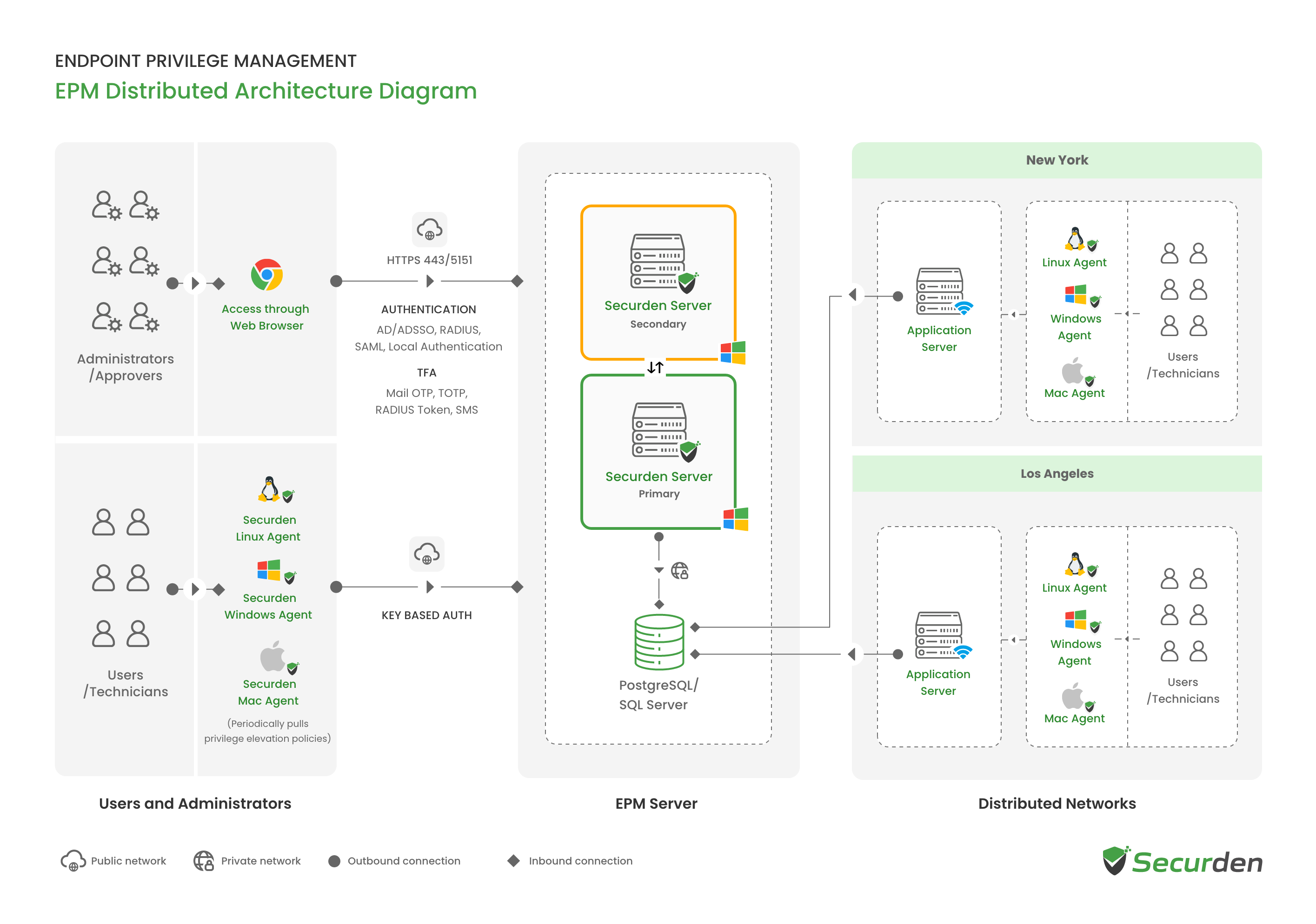
For managing large deployments involving multiple disjoint networks using a single dashboard, Securden Endpoint Privilege Manager supports distributed deployment architecture through application servers.
The application servers reside inside each of these networks and communicate with the Securden server through secure channels. The application server has permissions to read and write on the database directly.
The policies created by administrators can be centrally enforced on endpoints across networks seamlessly. Activities are tracked and recorded as audit trails centrally.
Integrations
Securden integrates with your existing technology stack to provide a seamless user experience. Integration with SIEM, MFA, and ITSM solutions are supported out of the box for specific use case scenarios.
SIEM for Centralized Audit Logging
Securden integrates with SIEM tools like LogRhythm, IBM QRadar, Splunk, and Azure Sentinel to share logs related to privilege management and application access.
Multi-Factor Authentication
Securden integrates with multi-factor authentication solutions like Google Authenticator, Microsoft Authenticator, Duo, YubiKey, RADIUS authentication and natively provides Mail OTP, SMS OTP. Securden supports FIDO2 & Web Auth-based Passkeys for secure, passwordless login.
ITSM/Ticketing Systems
Securden integrates with leading ITSM solutions like ServiceNow, Jira, Zendesk, Freshdesk, ManageEngine Service Desk Plus, and SolarWinds ITSM. Requests raised by users can be managed directly from your ITSM interface.
All these functionalities are delivered on a single installation. An installation instance can just have one physical server or multiple application servers as required.
The database columns are encrypted (AES-256) and the database is designed as strictly access controlled. Every installation is guarded by a unique encryption key.
Ports and Protocols Used by Securden EPM On-Premises
| Service | Port | Protocol / Security | Source | Destination |
|---|---|---|---|---|
| PostgreSQL Database | 5252 | TLS/TCP | Primary, secondary, and all application servers | PostgreSQL server |
| MS SQL Database | 1433 | TLS/TCP | Primary and application servers | MS SQL server |
| Securden EPM Server | 5151 | HTTPS | User endpoints, agents, and secondary servers | Primary server |
| SMTP Mail Server | 587 | TLS | EPM server | SMTP server |
| 465 | SSL | |||
| 25 | TCP | |||
| Active Directory Domain Controller | 636 | TLS | EPM server | Active Directory domain controller |
| 389 | TCP | |||
| Entra | 443 | HTTPS | EPM server | Microsoft Graph API |
| RADIUS Server | 1812 | UDP | EPM server | RADIUS server |
| SIEM Server | 514 | UDP | EPM server | Syslog server |
| 1470 | TCP | |||
| 6514 | TLS |
Deployment Recommendations
- PostgreSQL is the default database, while MS SQL Server 2019 or later is recommended.
- Configure a dedicated SMTP server or an API-based email integration with Gmail or Outlook to enable email alerts and reports.
- Create a public DNS record that maps the EPM server's hostname to its IP address. Install a public SSL certificate on the application server to authenticate and encrypt connections between user devices and the EPM server.
- Finally, configure the required firewall rules for database connectivity, communication between endpoint agents and the primary server, email delivery, Active Directory integration, and RADIUS authentication, as applicable to the deployment.
Endpoint Privilege Manager Cloud Edition Overview
Securden EPM is available as a highly available, completely cloud hosted solution, managed by Securden. The server handles all business logic while using AWS’s RDBMS to store all sensitive information in encrypted format.
Components of Securden Endpoint Privilege Manager Cloud Edition
The endpoint privilege manager has the following components in a typical organization.
- Privilege Management Server – Hosted on cloud
- Agents running on Windows, MacOS, and Linux endpoints.
- Securden Remote Connector for connecting Active Directory domain controller to the privilege management server.
Product Architecture
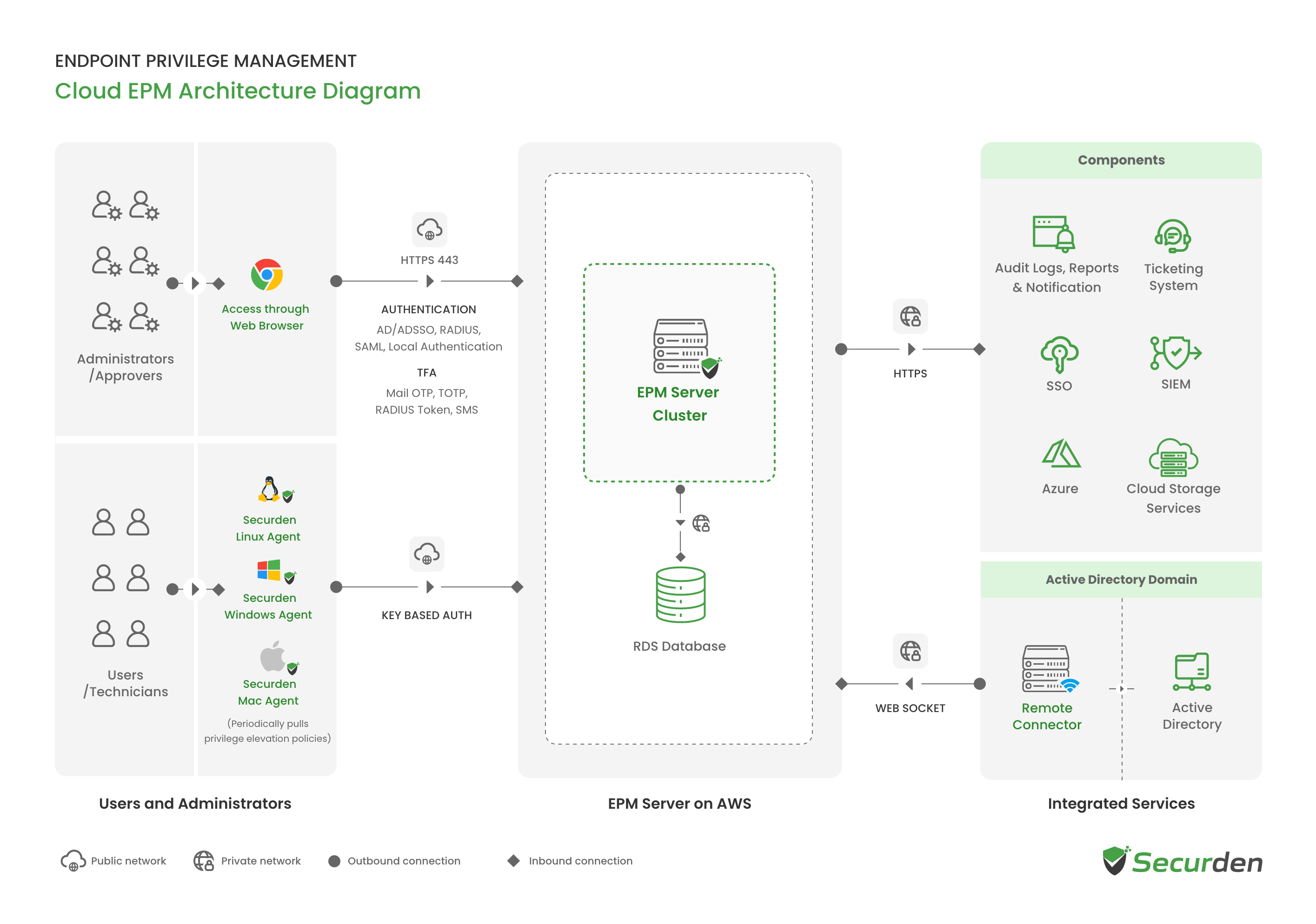
The architecture diagram comprises all the components of the endpoint privilege manager deployed as a SaaS solution.
Privilege Management Server
The privilege management server handles all the business logic of the solution coordinating policies, requests, application control measures, auditing, and tracking user activities. The server is hosted on AWS with strict access controls and high availability setups.
Database
All sensitive data such as device information and admin account credentials are stored in the RDBMS provided by Amazon in encrypted form using the AES 256 algorithm. Data of each organization is encrypted using a unique encryption key and is securely stored in Amazon KMS.
Securden Agent
The Securden Agent must be installed on required endpoints. At the time of installation, the server creates a unique key for each agent. This key is used for authentication every time the agent queries the server. The agents pull the policies from the server and ensure they are enforced appropriately. The agent is the primary interface for users on their endpoints. Users raise requests, view approval status, and avail offline access permissions using the Securden Agent.
Remote Connector
The remote connector is used to onboard domain devices and users registered with Active Directory domain. The connector helps establish connectivity between the Securden server and the domain controller. This helps discover users and devices from Active Directory environments.
Product Modules
Securden Endpoint Privilege Manager Cloud Edition is deployed as a single solution comprising the following modules.
Endpoint Privilege Management (Windows, macOS, and Linux)
Eliminates local admin rights and dynamically elevates applications for standard users in compliance with the principle of least privileges through Just-in-Time, just enough access.
Application Control
Controls which applications users are allowed to execute on their endpoints through allowlisting (explicit trust) and blocklisting (implicit trust) policies.
Secure Remote Access
Helps technicians troubleshoot remotely through attended, unattended agent-based sessions, and on-demand browser-based sessions.
Ports and Protocols Used by Securden EPM for SaaS Deployment
| Service | Port | Protocol / Security | Source | Destination |
|---|---|---|---|---|
| Securden EPM Server | 443 | HTTPS | User endpoints, agents, and secondary servers | Primary server |
| 465 | SSL | |||
| 25 | TCP | |||
| Active Directory Domain Controller | 636 | TLS | EPM server | Active Directory domain controller |
| 389 | TCP | |||
| Entra | 443 | HTTPS | EPM server | Microsoft Graph API |
| RADIUS Server | 1812 | UDP | EPM server | RADIUS server |
| SIEM Server | 514 | UDP | EPM server | Syslog server |
| 1470 | TCP | |||
| 6514 | TLS |
Integrations
Securden integrates with your existing technology stack to provide a seamless user experience. Integration with SIEM, MFA, and ITSM solutions are supported out of the box for specific use case scenarios.
SIEM for Centralized Audit Logging
Securden integrates with SIEM tools like LogRhythm, IBM QRadar, Splunk, and Azure Sentinel to share logs related to privilege management and application access.
Multi-Factor Authentication
Securden integrates with multi-factor authentication solutions like Google Authenticator, Microsoft Authenticator, Duo, YubiKey, RADIUS authentication and natively provides Mail OTP, SMS OTP. Securden supports FIDO2 & Web Auth-based Passkeys for secure, passwordless login.
ITSM/Ticketing Systems
Securden integrates with leading ITSM solutions like ServiceNow, Jira, Zendesk, Freshdesk, ManageEngine Service Desk Plus, and SolarWinds ITSM. Requests raised by users can be managed directly from your ITSM interface.
Secure Remote Access and Assistance (SRA) - Licensed Separately
Securden provides the secure remote assist functionality as an add-on to the Endpoint Privilege Management platform. By leveraging the same Agent-Server architecture, it allows helpdesk technicians to launch attended, unattended, and on-demand (browser-based) remote sessions to endpoints to offer remote assistance. Securden Secure Remote Assist allows seamless troubleshooting and remote assistance while complying with Zero-Trust and Least Privilege principles.