Architecture Overview
Securden AI Security & Governance is a cloud-hosted SaaS solution for discovering, governing, testing, and protecting AI agents and AI tools. Securden hosts and manages the platform on AWS, so there are no application servers, databases, or gateway servers for customers to deploy and maintain.
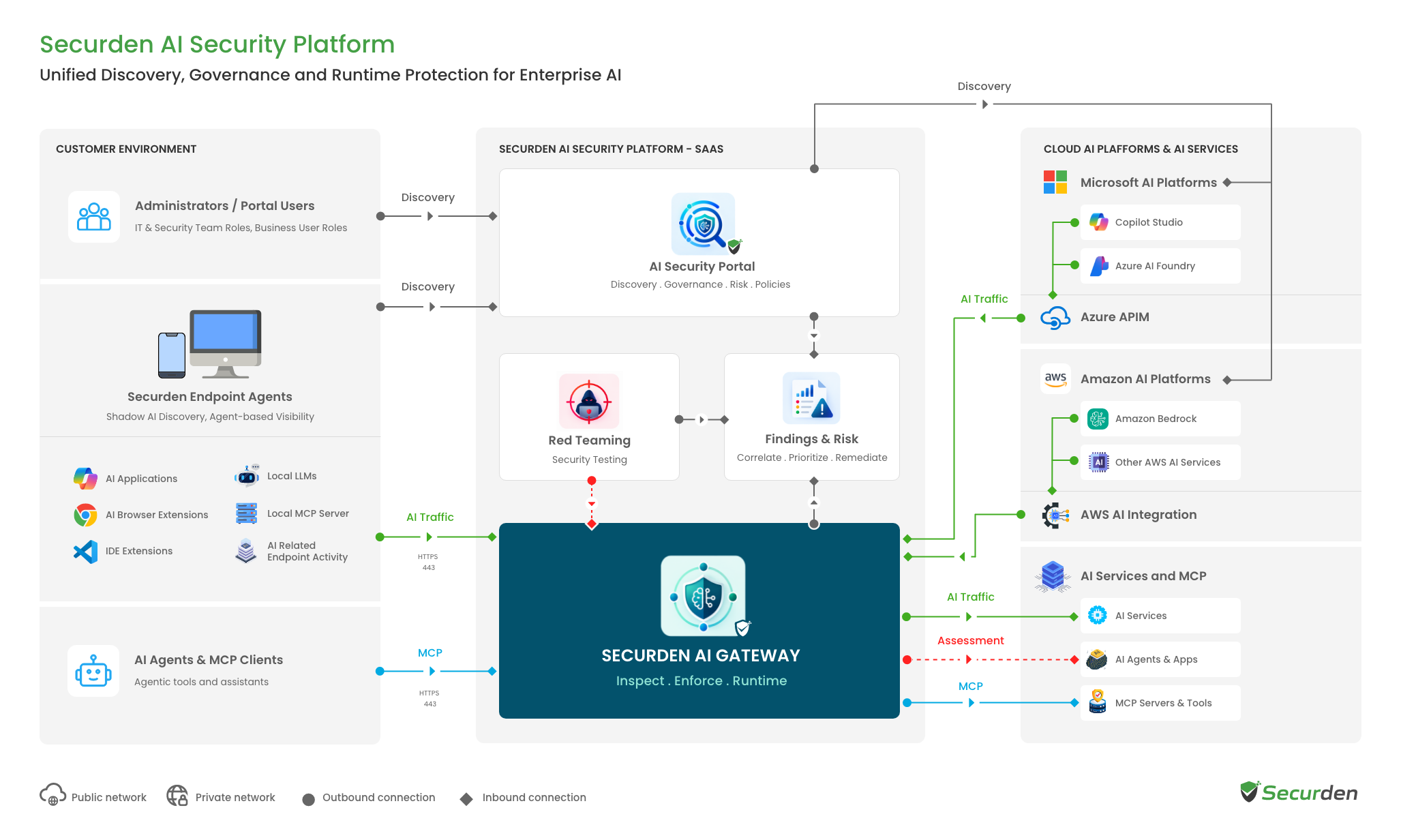
The solution has three main Securden components: the AI Security Portal, the Securden AI Gateway, and the Securden Endpoint Agent. The portal is the central console for managing AI security. The gateway inspects AI traffic and enforces runtime security policies. The Endpoint Agent runs on Windows machines to discover AI use on employee devices and route AI traffic to the gateway for policy enforcement.
AI agents built on Microsoft Copilot Studio, Microsoft Foundry, Amazon Bedrock, and Amazon Bedrock AgentCore are connected to Securden using the integration supported by each platform.
AI Security Portal
The AI Security Portal is the central console for AI discovery, governance, risk assessment, and runtime security. It maintains an inventory of discovered AI agents, AI tools, endpoints, and the resources associated with them. Security teams can see what AI is in use, review risks and findings, configure security policies, run Red Team Assessments, and investigate runtime events from the same console.
The portal also records administrative activity and shows the status of connected platforms and Endpoint Agents.
Securden AI Gateway & Runtime Protection
The Securden AI Gateway is the enforcement layer for runtime security. When runtime protection is enabled, protected AI traffic is inspected against the policies configured in the AI Security Portal before it reaches the AI service. Depending on the policy, Securden can block the request, monitor it by recording it without interrupting it, or redact sensitive information before forwarding it.
The gateway is hosted and managed by Securden. Customers do not need to install or maintain a separate gateway server. How traffic reaches the gateway depends on where the AI is running. Endpoint traffic is routed by the Securden Endpoint Agent, while cloud AI platforms use platform-specific integrations such as AWS Lambda, Amazon Bedrock AgentCore Gateways, or Azure API Management. Some of these integration components are set up in the customer's own cloud account, as described in the network architecture section.
Red Team Assessment traffic also uses the Securden AI Gateway.
The gateway follows a fail-open design to support business continuity. If the gateway cannot be reached, AI traffic continues without interruption. The gateway is also optimized to keep added latency to a minimum, so the impact on users is negligible under normal operating conditions.
Securden Endpoint Agent
The Securden Endpoint Agent is installed on Windows machines to discover the AI tools employees use and route their AI traffic to the Securden AI Gateway, where Shadow AI and runtime policies are enforced. Each discovered item is associated with the user who accessed or ran it.
The agent communicates with the Securden service over HTTPS on port 443 using outbound connections, so no inbound firewall rules are required. Proxy-based environments are supported.
The agent supports Windows 10 and later and Windows Server 2019 and later. It can be installed manually, deployed using Group Policy, or rolled out through any mobile device management (MDM) tool, such as Microsoft Intune. Once installed, its status, version, and last connected time are visible in the AI Security Portal.
AI Agent Discovery
Securden discovers AI both on employee devices and across connected cloud AI platforms.
On Windows endpoints, the Securden Endpoint Agent discovers AI websites, applications, browser extensions, IDE extensions, and local AI models. Applications that cannot be identified automatically are sent to a review queue, where administrators can classify them as AI or non-AI.
For cloud AI, administrators connect Microsoft Copilot Studio, Microsoft Foundry, Amazon Bedrock, and Amazon Bedrock AgentCore to Securden with the permissions required for discovery. Securden scans the connected environments and builds an inventory of AI agents and the components associated with them, including models, tools, workflows, knowledge sources, owners, and identities where available.
Microsoft discovery can be scoped to selected environments, while AWS discovery can be limited to selected regions. Discovery can also be run again on demand to pick up changes made on the source platform.
Red Team Assessments
Red Team Assessments test AI agents against adversarial scenarios such as prompt injection, sensitive data disclosure, and excessive agency. Each assessment runs a series of multi-turn attack conversations against the selected agent and records which attacks succeeded.
The results show the overall assessment score, attacks attempted, successful attacks, and the findings generated from them. Security teams can review the full attack conversation behind each finding and export assessment reports for further analysis.
Cloud Platform Permissions
Connections to cloud AI platforms require permissions to read agent configurations and related resources. Additional permissions may be required when runtime protection is enabled, depending on how Securden integrates with the platform.
The exact permissions required for Microsoft Copilot Studio, Microsoft Foundry, Amazon Bedrock, and Amazon Bedrock AgentCore are documented in their respective setup guides.
Securden checks whether agent activity logging is enabled on each platform, such as AWS CloudTrail for Amazon Bedrock and Power Platform audit logging for Microsoft Copilot Studio, and raises a finding if agent activity is not being recorded.
AD, SSO & MFA Integration
The AI Security Portal supports local accounts and integrates with Active Directory, Microsoft Entra ID, LDAP, and RADIUS for user management and authentication. Users authenticate through the configured directory, and directory passwords are not stored.
SAML 2.0-based single sign-on is supported with Microsoft Entra ID, Okta, ADFS, OneLogin, PingIdentity, Google Workspace, and other SAML identity providers.
Multi-factor authentication is supported through TOTP authenticators such as Google Authenticator and Microsoft Authenticator, Securden Authenticator, Duo Security, RSA SecurID, YubiKey, email OTP, and RADIUS-based MFA. Access within the portal is controlled through predefined and custom roles.
Audit Trail
Administrative activity in the AI Security Portal is recorded in the audit trail. This includes actions such as creating or modifying policies and changing product configuration. Each record shows who performed the action, the source IP address, and when it occurred.
Audit information can be exported, on demand or on a schedule, for external analysis. The platform also supports forwarding selected audit logs to external systems via Syslog, enabling integration with external log management and security monitoring tools.
Encryption and Data Security
Data stored by Securden is encrypted using AES-256, while data transmitted between Securden and connected systems is protected using TLS 1.2 or later. Encryption keys are unique to each customer and are managed through AWS Key Management Service (KMS), so each customer's data is segregated using its own encryption key.
Customers select a data residency region when their environment is provisioned. The currently available regions are the United States, European Union, and India.
Runtime protection requires the Securden AI Gateway to inspect AI requests. Prompts and responses are retained after inspection to support audit and security monitoring. Before they are stored, any sensitive information or personally identifiable information (PII) found during inspection is automatically redacted.
Runtime Events capture the information needed for security auditing and threat analysis:
- Session and request IDs
- User identity and agent name
- Direction of traffic (inbound prompt or outbound response)
- The redacted prompt or response text
- AI tools triggered during the session
- Security details: block reasons, risk scores, and blocked threat categories
- Timestamps
By default, runtime security records are automatically deleted after 30 days.
Data Backup & Compliance
Securden manages database backups as part of the SaaS service. Automated daily snapshots of the Amazon Relational Database Service (RDS) database are taken and stored in a backup vault in a separate AWS region to support disaster recovery and regional resilience. Customers do not need to deploy or maintain separate backup infrastructure.
The service is covered by Securden's SOC 2 Type II and ISO 27001 certifications.
AI Agent Governance & Security Network Architecture
The way AI traffic reaches the Securden AI Gateway depends on where the AI is running. The following scenarios show how runtime protection works across employee endpoints and supported cloud AI platforms.
Case 1: Shadow AI on Employee Endpoints
Employees access AI websites and applications from Windows machines. The Securden Endpoint Agent identifies this traffic and routes it to the Securden AI Gateway, which enforces the Shadow AI policies configured in the AI Security Portal before the traffic reaches the AI service.
In the current release, Shadow AI policies can be used to control access to supported AI websites and applications.
Case 2: AI Agents on Amazon Bedrock and Amazon Bedrock AgentCore
For Amazon Bedrock, Securden deploys an AWS Lambda function in the customer's AWS account, in each configured AWS region, as part of the runtime protection path. The function is connected to an agent when runtime protection is enabled for that agent.
For Amazon Bedrock AgentCore, administrators select the AgentCore Gateways they want Securden to protect. Traffic through those gateways is then inspected against the runtime security policies configured in Securden.
Case 3: AI Agents on Microsoft Foundry and Microsoft Copilot Studio
For Microsoft Foundry, runtime protection can be configured through Azure API Management or through the supported direct integration. Administrators select the Foundry resources that should be protected, and traffic from those resources is inspected against the policies configured in Securden.
For Microsoft Copilot Studio, Securden establishes the runtime integration using a federated application identity. Securden provides the Application ID and endpoint information, which the administrator configures in the Microsoft Power Platform admin center.
Every request blocked by the Securden AI Gateway is recorded in Runtime Events along with information about where the request came from, the associated user or identity, and why it was blocked.