Secure Remote Assist Overview
Secure Remote Assist is a Secure Remote Access and Assistance (SRA) solution that allows IT support technicians to launch attended, unattended, and browser based, instant sessions to remote devices. Remote access is compliant with the principle of least privileges through strict access controls and activity tracking measures.
Product Components
Agent based remote sessions between remote client and remote server are handled through secure encrypted channels. The Securden Agent must be installed on both the remote client and remote server.
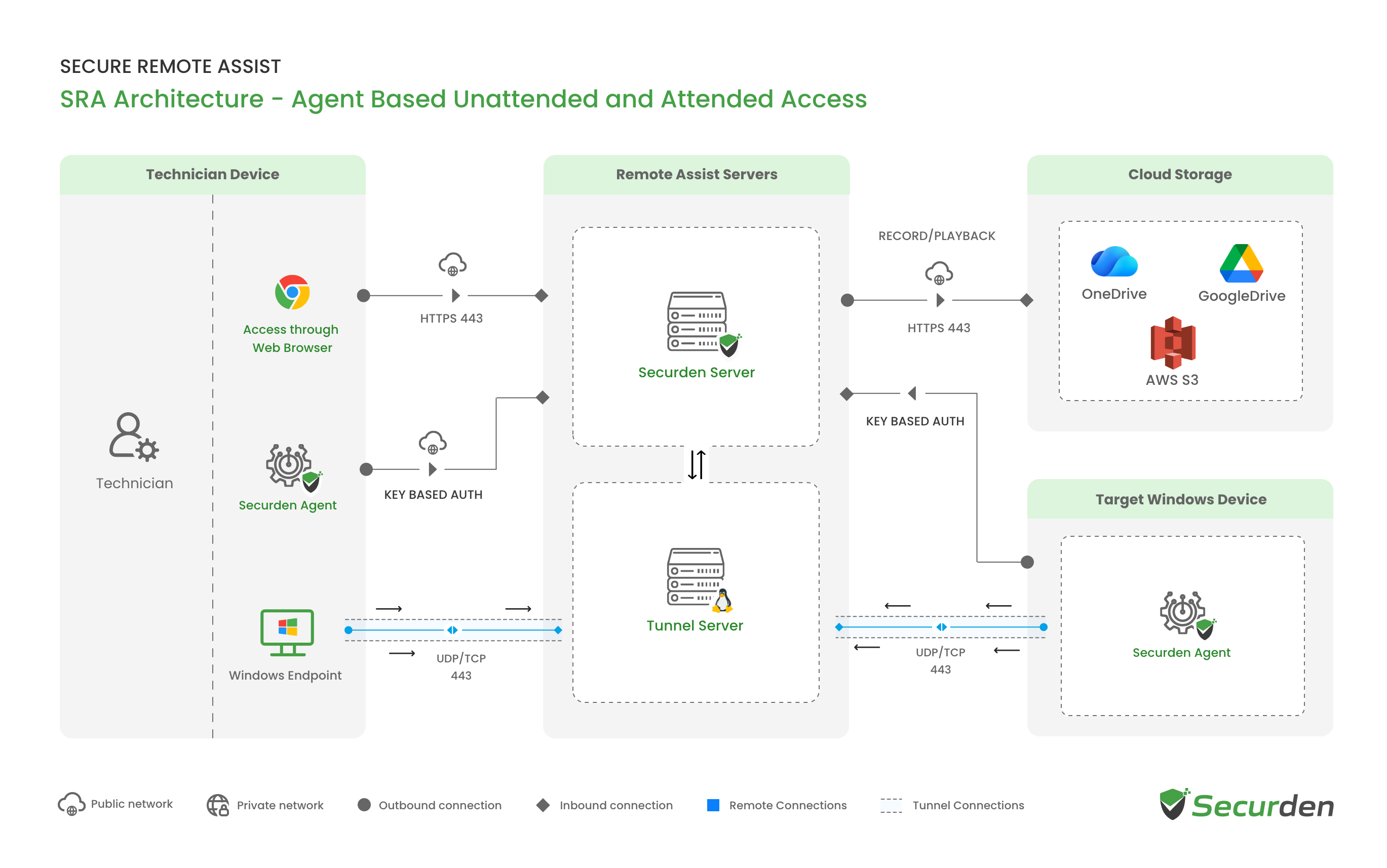
For browser-based, instant sessions, users will be prompted to install the Securden Remote Session Co-ordinator at the time of session initiation. Once installed, the connection will be made through this lightweight tool.
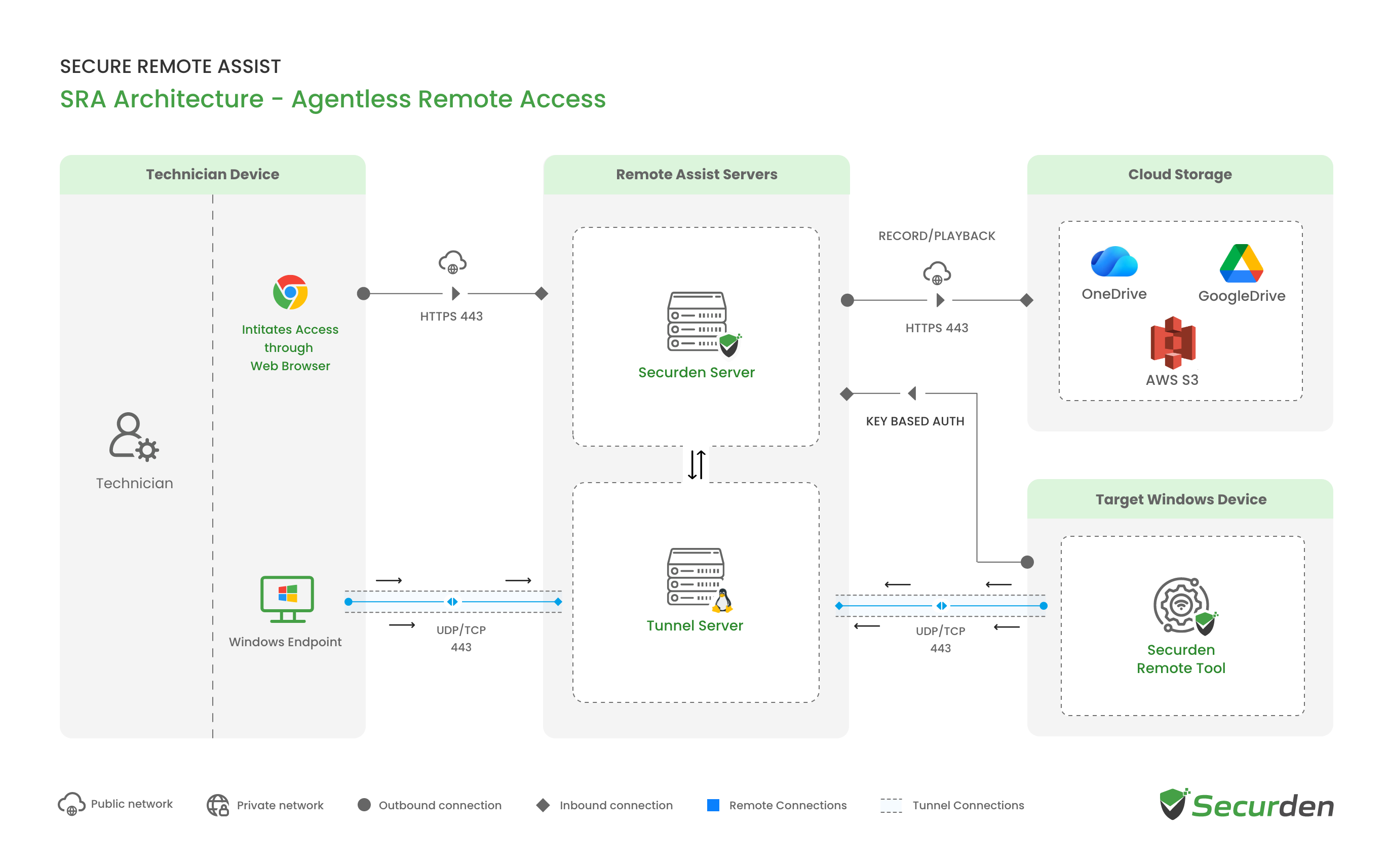
The major product components are as follows
- Secure Remote Assist Application Server
- Secure Remote Assist Tunnel Server
- Database
- Securden Agent
Securden Server
The Securden Server acts as the brain behind all operations managing remote assist policies, sessions, and auditing activities. The server is hosted in AWS and secured through robust access controls. Administrators can access the Securden Server interface through any standard web browser.
The server handles all business logic and ensures the remote access policies are enforced, and the technicians have access only to their designated devices.
Securden Remote Tool
The tool is used by Securden to create tunnels between the remote machine and the tunnel server. The tool must also be installed on the technician’s machine for creating the tunnel. The installation can be done dynamically at the session runtime. Once the session is terminated, the tool is no longer required and can be safely removed from the remote device.
Securden Tunnel Server
Whenever a remote session is initiated, the remote client and server connect to the tunnel server through TLS. The entire remote connection is handled through the tunnel server until the session is terminated. The tunnel server simply relays the encrypted web traffic from the remote device to the technician’s device. It neither stores nor processes the data transmitted through the tunnel server.
Database
All sensitive data such as device information and admin account credentials are stored in the RDBMS provided by Amazon in encrypted form. Data of each organization is encrypted using a unique encryption key and is securely stored in the Amazon KMS. This database also stores the encryption key used to encrypt data transmitted during remote sessions.
Securden Agent – Only for Attended and Unattended Access
The Securden Agent must be installed on required endpoints and the technician machine to facilitate agent based remote sessions. The agents ensure the remote devices are running and available for remote access apart from coordinating the connection between the remote client and server.
Cloud Storage Service
You may configure cloud storage services like Amazon S3, Google Drive, and One Drive as your preferred location for storing recorded sessions. The recorded files will be encrypted at the application server before being uploaded to your cloud storage service.
How it Works?
When users require IT support, they contact the helpdesk team through the official channels (Team, Slack, Email, etc.). A technician can initiate a remote session either through the Securden web interface (agentless sessions) or through the agent installed on their machine.
Once the session is initiated, the Securden server verifies that the remote client meets the required prerequisites and establishes a secure connection. Secure tunnels are established between the remote client, the remote server, and the Securden Tunnel Server to facilitate remote troubleshooting.
Multiple technicians can join the same remote session to collaborate on troubleshooting. Secure connections are also established between the Securden Tunnel Server and the Agents running on the respective machines.
When a technician needs to assist multiple remote clients simultaneously, a separate secure tunnel is established for each client. The technician can then connect to the respective sessions through the Securden server and provide support to multiple users concurrently.
The Securden server tracks session activities, including privilege elevation events and the applications accessed, for auditing purposes.
Recorded Sessions – Storage
By default, the sessions are recorded at the viewer’s (technician) machine. The session recording is uploaded to the Securden Application Server and stored in the cloud storage service configured. Optionally, the recordings can also be configured to directly upload to your own Linux SFTP server. Contact support@securden.com for configuring offline SFTP storage.
Data Encryption for Storing Recorded Sessions
During the session, the technician’s screen is recorded as an MP4 file on the technician’s machine. Once the session is over, the video file is uploaded to the Remote Assist Application server where it is encrypted using the organization-specific encryption key and stored in the cloud storage service configured. The encryption key is securely stored in the Amazon KMS service.
Deployment Recommendations
- PostgreSQL is the default database, while MS SQL Server 2019 or later is recommended.
- Configure a dedicated SMTP server or an API-based email integration with Gmail or Outlook to enable email alerts and reports.
- Create a public DNS record that maps the EPM server's hostname to its IP address. Install a public SSL certificate on the application server to authenticate and encrypt connections between user devices and the EPM server.
- Finally, configure the required firewall rules for database connectivity, communication between endpoint agents and the primary server, email delivery, Active Directory integration, and RADIUS authentication, as applicable to the deployment.