A jump box server is a hardened, intermediary system that sits between your administrative workstations and the critical servers, devices, or infrastructure you need to manage. Instead of connecting directly to a production server or network device, administrators first log into the jump box, and from there, access target systems.
The idea is to reduce your attack surface by funnelling all administrative traffic through a single, tightly controlled point. That point is easier to monitor, harden, and audit than dozens of individual admin endpoints.
Jump boxes go by several names — jump server, jump host, and bastion host are often used interchangeably, though there are subtle differences (covered later). The underlying concept is the same: one controlled gateway for privileged access.
How Does a Jump Box Server Work?
A jump box sits in a network segment that can reach both the administrator's network and the target environment[cite: 1234]. Admins authenticate into the jump server first, then establish a second connection to the target system from there[cite: 1235]. Here's what that flow looks like in practice[cite: 1236]:
Connection flow[cite: 1237]:
- An administrator initiates a remote session from their workstation [cite: 1238]
- They authenticate to the jump server (typically via SSH or RDP, usually with MFA) [cite: 1239]
- Once inside the jump server, they open a second connection to the target system [cite: 1240]
- All traffic to the target passes through, and is visible at the jump server [cite: 1241]
- The session ends; the jump server logs the activity [cite: 1242]
The target systems never accept inbound connections from arbitrary endpoints[cite: 1243]. Firewall rules enforce this: only the jump server's IP is permitted to initiate connections to the protected zone[cite: 1244].
SSH-Based Jump Servers
In Linux/Unix environments, SSH is the standard protocol[cite: 1245]. Administrators use SSH to connect to the jump host, then SSH again (or use SSH ProxyJump/ProxyCommand) to reach target servers[cite: 1246]. The jump host acts as the relay[cite: 1247].
RDP-Based Jump Servers
In Windows environments, Remote Desktop Protocol handles the same function[cite: 1249]. Admins RDP into the jump server and then launch RDP sessions to target Windows servers from there[cite: 1250]. Some organizations run both SSH and RDP on the same jump server to handle mixed environments[cite: 1251].
Cloud Jump Hosts
Cloud providers offer native equivalents[cite: 1253]. AWS Systems Manager Session Manager, Azure Bastion, and GCP's Identity-Aware Proxy all function as managed jump server services, removing the need to maintain a self-hosted jump box while preserving the segmentation model[cite: 1253]. These are increasingly common as infrastructure moves to the cloud[cite: 1254].
Jump Server Workflow Example
To make this concrete imagine a retail company with 200 point-of-sale servers in a PCI-scoped network segment[cite: 1255]. No admin workstation has direct access to that segment[cite: 1257]. Instead:
- An admin opens an SSH client from their workstation and connects to the jump server's IP [cite: 1258]
- They authenticate with a username, password, and a TOTP code from their authenticator app [cite: 1259]
- Now inside the jump server, they initiate a second SSH connection — this time to a specific POS server in the PCI zone [cite: 1260]
- They run their maintenance tasks (patching, log review, config changes) on that target server [cite: 1261]
- They close both sessions when done [cite: 1262]
- The jump server has logged the full session: authentication event, which target server was accessed, every command run, duration, and the admin's identity [cite: 1263]
- The firewall enforces one rule throughout: SSH into the PCI zone is permitted only from the jump server's IP[cite: 1264].
If an admin's laptop is compromised, the attacker still can't reach the PCI servers directly[cite: 1265]. They'd need to compromise the jump server too — a hardened, monitored target with no direct internet exposure[cite: 1266]. Much harder, and far more likely to trigger an alert[cite: 1267].
Why Organizations Use Jump Servers
Jump servers solve a real problem: how do you give administrators the access they need without exposing critical systems to every endpoint they work from[cite: 1269]?
Secure Administrative Access
Administrators often work from laptops that browse the web, receive email, and run a wide range of software[cite: 1271]. These are not clean machines[cite: 1272]. Requiring all privileged sessions to go through a dedicated, hardened server means that even if an admin's endpoint is compromised, it doesn't translate directly into access to production systems[cite: 1272].
Network Segmentation
Jump servers enforce and support network segmentation[cite: 1273]. Production environments, OT networks, databases, and payment systems can all live in isolated network zones[cite: 1274]. The jump server is the only bridge — and it's a bridge with gates, cameras, and a log book[cite: 1275].
Reduced Attack Surface
Without a jump server, every admin workstation potentially becomes an entry point to sensitive systems[cite: 1277]. With one, only the jump server needs to be reachable by privileged protocols[cite: 1278]. That dramatically reduces the number of exposed endpoints[cite: 1279].
Centralized Access Control
Instead of managing who can access what across 50 different systems individually, you manage access at the jump server[cite: 1281]. Provisioning, deprovisioning, and policy changes happen in one place[cite: 1282].
Compliance Requirements
Regulators and auditors like jump servers because they produce clean, auditable trails[cite: 1284]. Several major compliance frameworks either require or strongly recommend centralized, monitored privileged access[cite: 1285]:
- PCI DSS requires access controls and logging for systems in the cardholder data environment [cite: 1286]
- HIPAA requires access management and audit controls for systems holding protected health information [cite: 1287]
- ISO 27001 requires controls around privileged access management [cite: 1288]
- SOC 2 requires logical access controls and monitoring [cite: 1289]
A well-configured jump server checks multiple boxes in each of these frameworks[cite: 1290].
Common Jump Box Server Use Cases
Accessing Production Servers
The most common use case[cite: 1292]. Developers, sysadmins, and DevOps engineers need to access production infrastructure, but not from their everyday workstations without controls[cite: 1293]. The jump server is the intermediary[cite: 1294].
Third-Party Vendor Access
Vendors, contractors, and managed service providers frequently need access to customer infrastructure[cite: 1296]. Rather than giving them VPN credentials or direct SSH keys, you give them time-limited access to the jump server[cite: 1297]. Their access is scoped, monitored, and revocable[cite: 1298].
Managing Critical Infrastructure
Network devices, storage systems, and security appliances are high-value targets[cite: 1300]. Routing all management access through a jump server limits exposure and ensures every access event is recorded[cite: 1301].
Remote IT Administration
Remote work has made jump servers even more relevant[cite: 1302]. IT teams administering systems across geographic locations use jump servers to maintain consistent access controls regardless of where the admin is working from[cite: 1303].
Accessing Cloud Environments
As organizations migrate to AWS, Azure, and GCP, jump servers (or their cloud-native equivalents) provide a consistent privileged access model across hybrid environments[cite: 1305]. Cloud jump hosts can be integrated with identity providers for SSO and MFA[cite: 1306].
OT/ICS Environments
Operational technology environments — manufacturing systems, SCADA, industrial control systems are particularly sensitive to direct network exposure[cite: 1308]. A jump server acts as the one controlled entry point between IT networks and OT networks, reducing the risk of malware propagation from corporate environments into critical infrastructure[cite: 1309].
Jump Servers in Hybrid and Multi-Cloud Infrastructure
In hybrid environments, administrators often need to reach on-premises systems, AWS environments, and Azure tenants in the same day[cite: 1311]. A centralized jump server (or a tiered architecture with jump servers per environment) provides a consistent access model that works across all of them, rather than requiring different tools and processes for each[cite: 1312].
Jump Box Server Architecture Explained
How you deploy a jump server matters almost as much as whether you deploy one[cite: 1314].
Single Jump Server Architecture
The simplest deployment: one jump server, one network segment it can reach[cite: 1315]. Works well for small environments or isolated use cases[cite: 1316]. The obvious drawback is a single point of failure — both from an availability and a security perspective[cite: 1316]. If this server is compromised, it's game over[cite: 1318].
Tiered Jump Server Architecture
Larger environments often use a tiered model: a primary jump server handles initial authentication, and secondary jump servers sit closer to different network zones (production, development, OT, cloud)[cite: 1320]. Admins hop through two layers[cite: 1321]. This limits lateral movement even if one jump server is compromised[cite: 1321].
DMZ-Based Jump Servers
Placing the jump server in a DMZ, a network segment between the external-facing network and the internal network is a common architectural pattern[cite: 1323]. The jump server accepts inbound connections from admin workstations on one side and can reach internal systems on the other[cite: 1324]. Firewall rules govern both directions[cite: 1325].
Zero Trust Access Architecture
In a zero trust model, the jump server concept evolves[cite: 1327]. Rather than trusting anyone who successfully authenticates to the jump server, every access request is evaluated based on identity, device posture, time, and context[cite: 1328]. Access is granted per-session, not per-user[cite: 1329]. Modern PAM platforms implement this by layering policy on top of the underlying jump server infrastructure[cite: 1329].
High Availability Jump Servers
For production environments where jump server downtime would block critical work, HA deployments use load balancers and clustered jump servers[cite: 1331]. This ensures access continuity while maintaining the security model[cite: 1332].
Where to Place a Jump Server in Your Network
This is where many organizations get it wrong[cite: 1334]. The jump server should:
- Not be on the same flat network as the systems it reaches [cite: 1335]
- Not be directly internet-accessible, rather it should be available where admins can reach it via VPN or a proxy first [cite: 1336]
- Sit in a dedicated management VLAN or DMZ with firewall rules that explicitly allow only the protocols and ports needed [cite: 1337]
- Have no unnecessary software or services running. It's a gateway, not a general-purpose server [cite: 1338]
Jump Box Server Security Risks
Jump servers improve security significantly compared to no controls at all, but they introduce their own risks that need to be understood and managed[cite: 1340].
- Single Point of Failure: Concentrating all administrative access through one server means one compromised server equals compromised access to everything behind it[cite: 1342]. This is the fundamental tension of the jump server model[cite: 1343].
- Credential Theft: Admins authenticate to the jump server with credentials[cite: 1345]. If those credentials are stolen through phishing, keylogging, or credential dumping, an attacker gets the same access the admin has[cite: 1345].
- Privilege Escalation: If an attacker gains limited access to the jump server (through a vulnerability or a low-privilege account), they may be able to escalate privileges and reach everything the jump server can reach[cite: 1347].
- Lateral Movement Risks: A compromised jump server is a perfect lateral movement platform[cite: 1349]. It has network access to your most sensitive systems, established trust relationships, and often has SSH keys or stored credentials for target systems cached on it[cite: 1350].
- Insider Threats: Jump servers that don't have robust session monitoring allow malicious or negligent insiders to do significant damage without leaving a clear audit trail[cite: 1352].
- Unmonitored Sessions: If sessions through the jump server aren't recorded and monitored, you lose much of the security value[cite: 1354]. You know someone logged in — you don't know what they did[cite: 1355].
- Shared Admin Credentials: Organizations that use shared accounts on the jump server (e.g., a shared "admin" account that multiple people know the password for) undermine accountability entirely[cite: 1357]. You can't attribute actions to individuals[cite: 1358].
- Malware Propagation: If an admin downloads a file to the jump server or runs malicious code on it, the jump server becomes a vector for spreading malware to the target systems it can reach[cite: 1359].
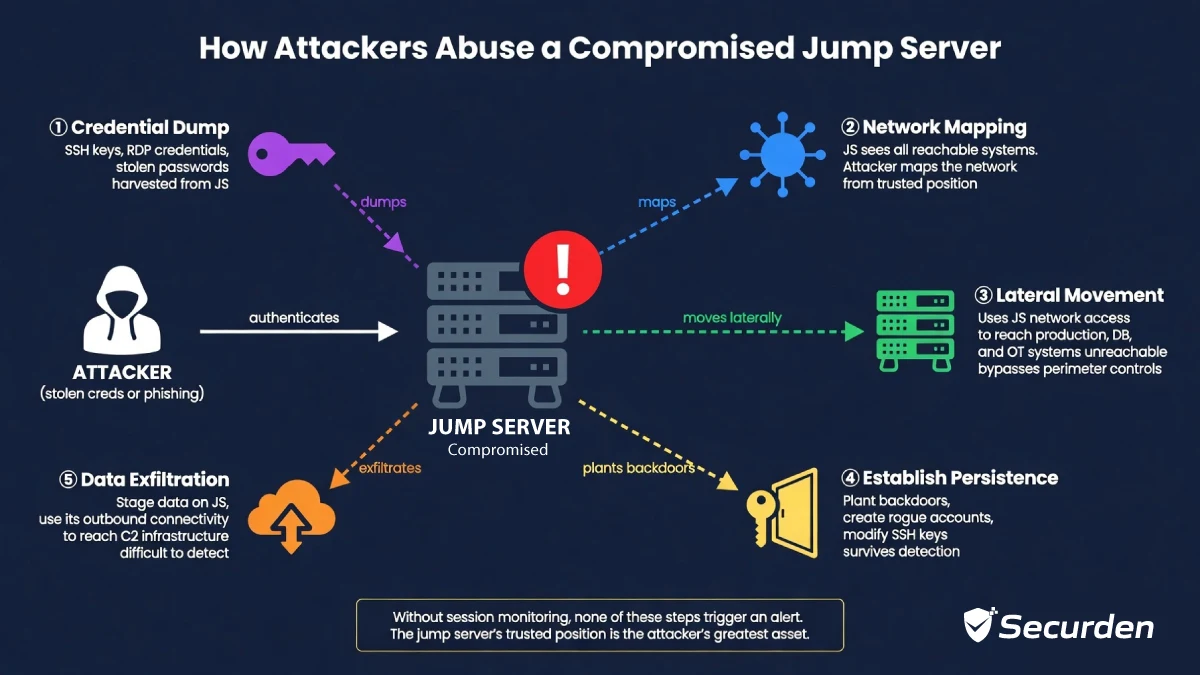
How Attackers Abuse Compromised Jump Servers
When attackers gain access to a jump server, they typically[cite: 1362]:
- Dump cached credentials: SSH keys, stored RDP credentials, and password manager data stored on the jump server [cite: 1363]
- Map the network: The jump server has visibility into what's reachable that an attacker's initial foothold might not [cite: 1364]
- Move laterally: Attackers can use the jump server's trusted network position to reach systems that were otherwise unreachable [cite: 1365]
- Establish persistence: They can plant backdoors or create rogue accounts that survive after the initial intrusion is discovered [cite: 1366]
- Exfiltrate data: Attackers can use the jump server's outbound connectivity to stage and exfiltrate data [cite: 1367]
This is why hardening the jump server itself, not just using it as a gateway is so important[cite: 1368].
Jump Server Security Best Practices
- Enforce MFA: Every authentication to the jump server should require a second factor[cite: 1371]. Password-only authentication is not sufficient given the privileged position the jump server holds[cite: 1372]. Hardware tokens, authenticator apps, and certificate-based authentication are all strong options[cite: 1373].
- Implement Least Privilege: Administrators should only be able to reach the systems they need, through the jump server[cite: 1375]. Don't give everyone access to everything[cite: 1376]. Use firewall rules and jump server access policies to enforce granular controls[cite: 1376].
- Use PAM Solutions: Privileged Access Management solutions layer credential vaulting, session management, access workflows, and monitoring on top of the underlying jump server infrastructure[cite: 1378].
- Session Recording and Monitoring: Record every session, ideally at a keystroke/screen level, so that if something goes wrong, you have a complete record of what happened[cite: 1381]. Integrate with a SIEM for real-time alerting on suspicious activity[cite: 1382].
- Disable Direct Internet Access: The jump server should not be able to initiate outbound connections to the internet directly[cite: 1384]. This limits what an attacker can do even if they compromise it — they can't easily reach command-and-control infrastructure or exfiltrate data over the open internet[cite: 1385].
- Use Just-in-Time Access: Rather than giving admins standing access to the jump server 24/7, JIT access provisions access for a specific session, for a specific purpose, for a specific window of time[cite: 1387]. Access that doesn't exist can't be abused[cite: 1388].
- Harden the Operating System: The jump server OS should be stripped down to the minimum[cite: 1390]. Remove unnecessary services, apply all patches, disable unused ports, configure host-based firewalls, and run regular vulnerability scans[cite: 1391]. Treat it like the high-value target it is[cite: 1392].
- Restrict Clipboard and File Transfers: Clipboard sharing and file transfer capabilities are common attack vectors[cite: 1394]. Restrict or disable them unless explicitly required for a specific use case[cite: 1395].
- Rotate Credentials Automatically: If the jump server has credentials stored for target systems, rotate them automatically and frequently[cite: 1397]. Manual credential management leads to stale, shared, and forgotten passwords[cite: 1398].
- Continuous Logging and Auditing: Log everything: authentication events, failed attempts, commands executed, files accessed, network connections initiated[cite: 1400]. Retain logs centrally, with tamper protection[cite: 1400]. Review them regularly, and alert on anomalies in real time[cite: 1401].
- Zero Trust Approach to Jump Servers: The zero trust model says: don't assume that because someone authenticated successfully, they should be trusted for the duration of their session[cite: 1403]. Apply continuous verification[cite: 1404]. Check device posture, evaluate behavioral patterns, and revoke access if something looks wrong mid-session[cite: 1404]. Modern PAM platforms increasingly implement this kind of policy-based access on top of the jump server model[cite: 1405].
Jump Box Server vs Bastion Host vs VPN
These three terms are often used interchangeably, but they're distinct concepts with different use cases[cite: 1407].
| Area | Jump Server | Bastion Host | VPN |
|---|---|---|---|
| Primary purpose | Controlled gateway for privileged admin access | Hardened host exposed to untrusted networks | Encrypted tunnel for network-level access |
| Security model | Access through an intermediary; monitored sessions | Hardened exposure point; assumes it will face attacks | Network-level trust once authenticated |
| Protocols | SSH, RDP, protocol-specific | Varies; often SSH | IPsec, SSL/TLS |
| Session monitoring | Central to the model | Depends on configuration | Typically limited |
| User access | Admins connecting to internal systems | Users/admins accessing a network perimeter | Any user; broad network access |
| Typical use case | Internal privileged access management | Hosting services exposed to the internet | Remote worker access to internal network |
| Granularity | High — per-system, per-protocol controls | Moderate — scoped to what the host exposes | Lower — typically grants broad network access |
In practice: a bastion host is often deployed as a jump server in cloud environments (AWS uses "bastion host" to describe what is functionally a jump server for EC2 access)[cite: 1409]. A VPN gives you network access; a jump server gives you controlled, monitored access to specific systems[cite: 1410]. They serve different purposes and are often used together[cite: 1411].
How PAM Improves Jump Server Security
Jump servers solve a network problem: they restrict which path you can take to reach a sensitive system[cite: 1413]. PAM solves an access governance problem: it controls the credentials, the session, the monitoring, and the audit trail around that access[cite: 1414]. Most organizations need both, but the jump server alone leaves significant gaps[cite: 1415].
- Credential Vaulting: Instead of storing credentials on the jump server or in admin workstations, PAM solutions vault all privileged credentials centrally[cite: 1417]. Admins never see the actual password — they request access, get a session, and the PAM system handles authentication to the target system behind the scenes[cite: 1418].
- Session Isolation: PAM platforms establish isolated sessions between the admin and the target system, with the PAM server acting as the broker[cite: 1420]. Even if the admin's endpoint is compromised, it never has a direct network path to the target[cite: 1421].
- Password Rotation: PAM solutions automatically rotate passwords for managed accounts on a schedule, or immediately after a session ends[cite: 1423]. This eliminates standing credentials that can be stolen and reused[cite: 1424].
- Access Approval Workflows: High-risk access — production databases, domain controllers, OT systems, can require explicit approval before a session is granted[cite: 1426]. This creates a human checkpoint that pure network controls can't provide[cite: 1427].
- Real-Time Session Monitoring: PAM platforms provide real-time visibility into active sessions: who is connected, to what system, doing what[cite: 1429]. Security teams can terminate suspicious sessions instantly[cite: 1430].
- Audit Trails: Every session, including screen recordings, keystroke logs, and command histories, is stored in a tamper-proof audit trail[cite: 1432]. This is essential for forensics, compliance reporting, and insider threat investigations[cite: 1433].
Traditional Jump Servers vs Modern PAM-Based Access
| Feature | Traditional Jump Server | PAM-Based Access |
|---|---|---|
| Credential management | Manual; credentials often cached | Vaulted; never exposed to admin |
| Session recording | Depends on configuration | Built-in, centralized |
| Access control | Network-level (firewall rules) | Identity-based, policy-driven |
| MFA enforcement | Requires separate configuration | Native to the platform |
| Audit trail | Basic log files | Rich session recordings + reports |
| Just-in-time access | Not inherent | Core feature |
| Credential rotation | Manual | Automated |
| Zero trust readiness | Low | High |
How to Set Up a Secure Jump Box Server
Step 1: Choose the OS
Use a minimal Linux distribution (Ubuntu Server, RHEL, Debian) or Windows Server Core for RDP environments[cite: 1438]. Start with the smallest possible footprint[cite: 1439].
Step 2: Harden the Server
- Remove all unnecessary packages and services [cite: 1441]
- Disable root SSH login; use named accounts [cite: 1442]
- Configure SSH with key-based authentication, disable password auth [cite: 1443]
- Apply all security patches; set up automatic security updates [cite: 1444]
- Enable host-based firewall (UFW, iptables, or Windows Firewall) [cite: 1445]
- Disable USB and removable media [cite: 1446]
- Configure audit logging (auditd on Linux, Windows Event Logging) [cite: 1447]
Step 3: Configure Network Segmentation
- Place the jump server in a dedicated management VLAN or DMZ [cite: 1449]
- Firewall rules: allow inbound only from admin workstation IPs or VPN range [cite: 1450]
- Firewall rules: allow outbound only to specific target systems on specific ports [cite: 1451]
- Block all other traffic by default [cite: 1452]
Step 4: Enable MFA
Configure MFA at the OS level (PAM modules for Linux, NPS/RADIUS integration for Windows) or use a PAM solution that enforces MFA at the access layer[cite: 1454].
Step 5: Configure Monitoring
- Forward all logs to a central SIEM [cite: 1456]
- Set up alerts for: failed login attempts, off-hours access, new user additions, privilege escalation events [cite: 1457]
- If using PAM, enable session recording [cite: 1458]
Step 6: Restrict Administrative Privileges
- Create individual named accounts for each admin — no shared accounts [cite: 1460]
- Apply least privilege: each account should only reach the systems it needs to [cite: 1461]
- Use sudo with explicit command restrictions on Linux; use tiered admin accounts on Windows [cite: 1462]
Step 7: Test and Audit Access
- Confirm firewall rules work as intended — test from both allowed and blocked source IPs [cite: 1464]
- Review access logs regularly [cite: 1465]
- Run quarterly access reviews: remove accounts that are no longer needed [cite: 1466]
- Conduct periodic penetration tests focused on the jump server [cite: 1467]
Common Jump Server Misconfigurations to Avoid
- Allowing internet-facing RDP or SSH directly to the jump server — require VPN first [cite: 1469]
- Using the jump server for anything other than privileged access — no web browsing, no email, no general-purpose work [cite: 1470]
- Shared "admin" accounts — every user needs their own named account [cite: 1471]
- Not patching the jump server — it's a high-value target; patch it first, not last [cite: 1472]
- Storing SSH keys on the jump server without protection — use PAM or at minimum passphrase-protected keys [cite: 1473]
- No session recording — logging logins without logging sessions gives you accountability without visibility [cite: 1474]
Best Tools for Secure Jump Server Access
PAM-Based Jump Access
Privileged Access Management platforms like Securden provide a full jump server capability with credential vaulting, session recording, just-in-time access, and audit trails built in[cite: 1477]. These are the right choice for organizations that need compliance-grade controls and real-time monitoring[cite: 1477].
SSH Bastion Hosts
For smaller teams or cloud-native environments, a hardened SSH bastion host (self-managed or via a tool like Teleport or BeyondCorp) provides strong SSH-specific controls at lower complexity[cite: 1479]. Best for engineering teams with Linux-heavy environments[cite: 1480].
Cloud Jump Server Solutions
AWS Systems Manager Session Manager, Azure Bastion, and GCP Identity-Aware Proxy eliminate the need to manage jump server infrastructure entirely[cite: 1482]. They integrate with cloud IAM, support MFA, and provide session logs natively[cite: 1483]. Recommended for cloud-first organizations that don't need on-premises coverage[cite: 1484].
Future of Jump Servers
- Zero Trust Network Access (ZTNA): ZTNA replaces the VPN+jump server model with identity-based access that evaluates every request in context — user identity, device health, location, and behavior[cite: 1487]. Jump servers become policy enforcement points rather than just network gateways[cite: 1488].
- Passwordless Administrative Access: Certificate-based and biometric authentication are making passwords optional even for privileged access[cite: 1490]. Eliminating passwords from the jump server authentication chain removes an entire class of credential-based attacks[cite: 1491].
- AI-Powered Session Monitoring: Machine learning models trained on normal admin behavior can flag sessions that look anomalous [cite: 1493] even when no specific rule is triggered[cite: 1494]. An admin who suddenly runs commands they've never run before, or accesses systems they don't normally touch, can be flagged in real time[cite: 1494].
- Agentless Secure Access: Modern PAM platforms increasingly support agentless access, where the target system doesn't need any software installed to participate in managed, monitored sessions[cite: 1496]. This is particularly valuable for OT/ICS environments where installing agents on legacy systems is impractical[cite: 1497].
- Cloud-Native PAM: As infrastructure becomes more ephemeral — containers, serverless functions, short-lived VMs, the concept of a persistent jump server needs to evolve[cite: 1499]. Cloud-native PAM handles dynamic, ephemeral infrastructure by integrating with cloud APIs rather than relying on fixed network topology[cite: 1500].
Securden Unified PAM can be deployed in minutes on a server on-prem or hosted on private cloud instances. Try now.


 140 E. Ridgewood Avenue, Suite 415, Paramus, New Jersey 07652
 support@securden.com
 +1 844 228 0327 (Toll Free)
 +44 203 868 6147